

Description
Pilot a bomber through the skies and rain TNT on the world below.
Mod Wiki
Phantom Tnt Bomber
Quickstart
Craft the Phantom Tnt Bomber, then place it in a clear area with room for its 8×8×8 structure:


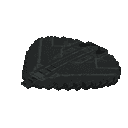
Right-click any part of the placed bomber to board it. The structure turns into a rideable aircraft, and you take the pilot’s seat.
- Move the mouse to aim and steer.
- W / S increase or reduce throttle.
- Left-click to fire an arrow.
- Space to drop TNT.
- Ctrl to exit.
Overview
The bomber is both a large placeable model and a flying vehicle. While piloted, it follows your aim and keeps moving at its current throttle. A cockpit HUD displays speed and heading.
What It Adds
- A craftable Phantom Tnt Bomber item that places the bomber’s multi-block structure.
- A single-pilot aircraft with a forward arrow launcher and a TNT bomb drop.
How To Use
Place the item where the full structure has space to form. It faces according to your horizontal facing when placed. Right-click any part of the structure to convert it into the aircraft and board it.
While flying, aim with the mouse to change direction. Use W to build speed or S to slow down; throttle persists, so reducing it does not stop the bomber. The aircraft automatically switches to third-person when you board and restores your previous view when you leave.
Abilities And Mechanics
- TNT: Each press of Space drops a primed TNT block beneath the bomber. It uses the normal TNT fuse, so give it time to fall before passing over your target. There is a brief delay between drops.
- Arrows: Left-click fires an arrow along your current aim, with a short firing delay.
- Damage: If the aircraft is damaged, it is removed, you are dismounted, and the bomber item is dropped.
Progression And Strategy
There is no upgrade path: craft the bomber and use it as soon as you have the ingredients. Practice steering and adjusting throttle in open space before making a bombing run, and account for the TNT’s fall and fuse when choosing your release point.
How to install
This Java mod can be used on Windows and Mac PCs with the CreativeMode Launcher or any Minecraft launcher of your choice.

1. Download and install the new CreativeMode Launcher

2. Click to play on the top of the screen.
3. That's it — launches instantly. No complicated setup required.
Want to use on a different launcher? Download mod and manually install.
Players also liked
Armor Stand Tank Arsenal


Armor Stand Tank Arsenal adds a highly detailed drivable tank built from invisible armor stands displaying blocks; place a tank with the Tank Spawner by right-clicking the ground and right-click a tank to mount it. Control the tank with WASD (W/S forward and back, A/D to turn); t…
Oppenheimer Nuke


Trinity is a one-time-use, handheld nuclear device—right-click on any block or in the air to plant and arm it, then watch a dramatic 10-second center-screen countdown complete with an urgent siren. When the timer hits zero, Trinity detonates in a blinding flash and unleashes a 20…
Lock On Bazooka


The Lock On Bazooka is a powerful ranged weapon that fires guided explosive missiles at targeted entities. Right-click to lock onto any living creature within 32 blocks in your line of sight - the item will glint when a target is successfully locked and display the target's name…
iron storm minigun


Item Description: Create a mini gun that uses iron nuggets as ammo. The gun should do 2.5 hearts of damage with each projectile and have a fire rate of 240 projectiles a second.
This mod is licensed under the CreativeMode Mods License.