

Description
Drink an ominous bottle near a village and unleash a raid of chaos.
Mod Wiki
Ominous Raid Bottles
Quickstart
- Obtain an Ominous Raid Bottle by crafting it, finding it in the creative inventory under Food & Drink, or using this command with cheats:
/give @s ominous-raid-bottles-wiww2y23:ominous_raid_bottles_wiww2y23 - Stand in or near a valid village. Prepare for combat before drinking.
- Hold the bottle and use it with the normal drink control. The drinking animation takes about 1.6 seconds.
- Finish drinking to start a raid. A raid bar appears, and hostile raiders attack the village.
- Defeat the raiders to complete the raid and receive the usual raid victory rewards.
In Survival, the empty bottle remains after drinking. In Creative, the Ominous Raid Bottle is not consumed.
Overview
Ominous Raid Bottles are drinkable items that trigger Minecraft raids. Drinking one near a valid village applies the raid-starting effect and immediately attempts to begin a raid.
If no valid village is detected, the raid does not start immediately, but the effect can remain active. Entering a valid village while the effect lasts may start a raid normally.
What It Adds
- Ominous Raid Bottle — a stackable drinkable item with a maximum stack size of 64.
- Raid triggering through drinking rather than waiting for the usual ominous effect source.
- Ominous Raid Bottles dropped by defeated pillagers.
- Normal raid behavior, including raid waves, the raid bar, raider tracking, difficulty scaling, and victory rewards.
How To Use
Starting a Raid
Hold an Ominous Raid Bottle and use it to drink. You must complete the drinking action for the bottle to activate.
For the most reliable result:
- Drink close to the village you want to defend.
- Make sure the village has enough space for raiders to spawn.
- Secure villagers and prepare weapons, armor, food, and healing items first.
- Keep an eye on the raid bar to locate remaining waves and raiders.
The bottle uses Minecraft’s normal raid system, so the raid’s difficulty and wave behavior follow the world’s difficulty settings.
After Drinking
In Survival, the bottle turns into a regular glass bottle. In Creative, your bottle stack remains unchanged, making it convenient for repeated testing.
Getting More Bottles
Pillagers drop Ominous Raid Bottles when they die. This allows raids and pillager encounters to provide a renewable source of bottles.
Crafting And Obtaining
The recipe is shapeless and uses one glass bottle, one fermented spider eye, one gunpowder, and one emerald:


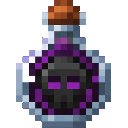
You can also obtain the item from the Creative inventory’s Food & Drink category or give it to yourself with:
/give @s ominous-raid-bottles-wiww2y23:ominous_raid_bottles_wiww2y23
Abilities And Mechanics
- Drinkable: Use the bottle like a potion or other drinkable item.
- Raid trigger: Near a valid village, finishing the drink starts a raid immediately.
- Bad Omen: The bottle grants the raid-starting effect before handing the effect to Minecraft’s normal raid manager. The effect is removed when the raid begins.
- Village requirement: A raid cannot begin unless Minecraft detects a valid village.
- Glass bottle return: Survival players receive an empty glass bottle after drinking.
- Pillager drops: Defeated pillagers can drop Ominous Raid Bottles.
- Raid victory: Completing a bottle-triggered raid provides the normal victory handling and Hero of the Village rewards for nearby players.
Progression And Strategy
Use the bottle when you are ready to defend a village rather than drinking it casually. Build walls, light the area, protect villagers, and keep a way to search for raiders outside the village boundary.
Because pillagers can drop more bottles, a successful raid can help supply future challenges. Keep spare bottles in a chest near a prepared village, and use Creative mode when you want to test raids without consuming the item.
How to install
This Java mod can be used on Windows and Mac PCs with the CreativeMode Launcher or any Minecraft launcher of your choice.

1. Download and install the new CreativeMode Launcher

2. Click to play on the top of the screen.

3. That's it — launches instantly. No complicated setup required.
Want to use on a different launcher? Download mod and manually install.
Players also liked
Error Lucky Block


This mod overhauls the Error Lucky Block: breaking one now yields either a single random piece of Error armor or a stack of 3–5 Error Food items instead of the full armor set. Equip any Error armor piece to receive ten continuous beneficial effects, and wear the full set to unloc…



Explosive Crossbow


The Explosive Crossbow fires devastating explosive projectiles that detonate on impact with any target. Right-click to launch an explosive arrow that creates a powerful explosion upon hitting mobs, players, or blocks, destroying terrain in the blast radius. The weapon has 326 dur…
This mod is licensed under the CreativeMode Mods License.