


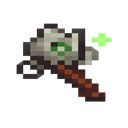
Description
The Monster Pet Tamer is a magical item that allows you to transform hostile monsters into loyal companions. Simply right-click on any hostile creature (zombies, skeletons, creepers, etc.) to tame them, and they will display a green "Fight" tag above their head while following you and attacking nearby threats within a 15-block radius. Right-click your tamed monsters again to toggle them between "Fight" mode (green tag - follows and protects you) and "Wait" mode (red tag - stays in place and won't move).
Mod Wiki
Monster Pet Tamer
Quickstart
- Craft or take the Monster Pet Tamer from the Functional item group in Creative mode.
- Hold it in your hand and right-click a hostile monster, such as a zombie, skeleton, or creeper.
- The monster becomes your companion and displays a green Fight tag above its head.
- In Fight mode, it follows you and attacks nearby hostile threats within 15 blocks.
- Right-click your tamed monster again to switch between:
- Fight — green tag; follows and protects you.
- Wait — red tag; stays in place and does not move.
Only the player who tamed a monster can change its mode.
Overview
The Monster Pet Tamer turns hostile monsters into persistent companions. Tamed monsters retain their original appearance but become loyal to their owner, follow them in Fight mode, and attack nearby untamed hostile creatures.
Each tamed monster has a visible colored name tag showing its current behavior mode.
What It Adds
- Monster Pet Tamer magical item
- Taming for hostile monsters
- Owner-bound monster companions
- Fight and Wait behavior modes
- Green and red mode tags
- Automatic following, protection, and hostile-target selection
- Persistent tamed monsters that do not naturally despawn
How To Use
Taming a Monster
Hold the Monster Pet Tamer and right-click a hostile monster. A successful tame starts the monster in Fight mode.
The monster will:
- Display a green Fight tag.
- Follow its owner.
- Look for nearby untamed hostile monsters.
- Attack threats within a 15-block area around its owner.
- Remain in the world instead of naturally despawning.
Changing Behavior Modes
Right-click your own tamed monster with the Monster Pet Tamer to toggle its mode.
| Mode | Tag color | Behavior |
|---|---|---|
| Fight | Green | Follows you and attacks nearby hostile threats |
| Wait | Red | Stays in place and does not move or attack |
Right-click the monster again whenever you want to switch modes.
Ownership
A tamed monster belongs to the player who tamed it. Other players cannot change its mode and will be told that the monster already has an owner.
Crafting And Obtaining
Craft the Monster Pet Tamer in a crafting table using rotten flesh, spider eyes, gunpowder, an ender pearl, and a lead.
In Creative mode, the item is also available in the Functional item group.
Abilities And Mechanics
Following
In Fight mode, a companion follows its owner when the owner moves away. If it gets more than 15 blocks from its owner, it teleports back to the owner.
Protection
A Fight-mode companion searches for nearby hostile monsters and attacks the closest eligible threat. Tamed monsters are not treated as targets for this protection behavior.
Waiting
Wait mode stops the companion from following, moving, or selecting targets. Use it to station monsters at a base, doorway, mine entrance, or other defensive position.
Visual Mode Tags
The name above each tamed monster identifies its current mode:
- Green Fight tag: active companion
- Red Wait tag: stationary companion
Progression And Strategy
- Tame several different hostile monsters to create a varied defensive group.
- Keep important companions in Wait mode at guarded locations.
- Switch to Fight mode before exploring dangerous areas.
- Use the 15-block protection area to keep companions close enough to help.
- If a companion falls behind, continue moving until it follows or teleports back.
- Remember that only the original owner can toggle a monster’s mode.
How to install
This Java mod can be used on Windows and Mac PCs with the CreativeMode Launcher or any Minecraft launcher of your choice.

1. Download and install the new CreativeMode Launcher

2. Click to play on the top of the screen.
3. That's it — launches instantly. No complicated setup required.
Want to use on a different launcher? Download mod and manually install.
Players also liked
Omni Clicker


create a minecraft item that has the following description: 'Create an clicker that has 3 different forms, mob, item, and block, to change which form it is, right click while holding it, with it you can click a block to copy it and paste it repeatedly until you press “done” while…

Abyssal Singularity


Abyssal Singularity is a placeable block that, when right-clicked, summons a 15-second black hole at its location, pulling in and damaging all hostile mobs within a 16-block radius while leaving players unharmed. After collapsing in a final burst of void energy, the block resets…

Prismatic Edge
 anon

create a minecraft item that has the following description: 'rainbow sword with enchantment sharpness level 1000'

Crowned Blade Pig


create a mob that looks like a pig which has the following appearance: 'a pig with a crown name technoblade' and the following behavior/capabilities: 'a player'

Diamond Beginner Kit


The Starter Kits mod adds a simple /kits command that opens a 6×9 GUI offering four one-time starter packs: Iron, Gold, Diamond, and Netherite. Left-click an ingot, gem, or scrap icon to instantly receive a full set of matching tools and armor (plus bonus diamonds for the Diamond…
This mod is licensed under the CreativeMode Mods License.