
Description
Create a simple Minecraft Bedrock Edition mod called **Loot Bags**. ## MAIN IDEA Add loot bags that players can open to receive random rewards. The mod should be extremely simple, polished, fun, and easy to understand. ## LOOT BAGS Add 5 loot bag rarities: **Common Loot Bag** * Mostly basic resources. * Small chance for better rewards. **Rare Loot Bag** * Better resources and useful items. * Chance for enchanted equipment. **Epic Loot Bag** * Valuable resources. * Better enchanted equipment. * Chance for rare items. **Legendary Loot Bag** * Very valuable rewards. * Strong enchanted equipment. * Small chance for extremely rare rewards. **GODLY Loot Bag** * Extremely rare. * Gives some of the best rewards available in the mod. * Should feel exciting when opened. ## OPENING Players open a loot bag by right-clicking/using it. When opened: 1. Play a satisfying opening sound. 2. Show particles around the player. 3. Display the rarity and reward. 4. Give the reward directly to the player's inventory. 5. Do not drop the reward on the ground. Make the opening animation short so players can quickly open multiple bags. ## REWARDS Possible rewards include: * Iron * Gold * Diamonds * Emeralds * Redstone * Lapis * Experience * Golden Apples * Enchanted Books * Enchanted tools * Enchanted armor * Netherite-related items * Rare blocks * Useful survival items Higher rarity bags should have significantly better reward tables. ## LUCKY BAG Add one special **Lucky Loot Bag**. The Lucky Loot Bag has a better chance of giving high-rarity rewards and can contain rewards from multiple rarity tiers. ## CRAFTING Make loot bags craftable using normal Minecraft materials. Common Bag: Paper + string + basic resource. Rare Bag: Common Loot Bag + better resource. Epic Bag: Rare Loot Bag + diamond. Legendary Bag: Epic Loot Bag + Netherite-related material. GODLY Bag: Legendary Bag + extremely valuable materials. Keep recipes reasonable for survival. ## VISUALS Give every bag a unique color and rarity appearance. Common = simple Rare = blue-themed Epic = purple-themed Legendary = gold-themed Godly = glowing rainbow/golden appearance Make the item icons clean and recognizable at Minecraft inventory size. ## IMPORTANT Keep the mod lightweight. Do not add dimensions, bosses, complicated menus, leveling systems, quests, or huge amounts of content. The entire mod should revolve around one satisfying mechanic: **GET BAG → OPEN BAG → GET LOOT → TRY FOR A BETTER BAG** Make everything reliable on Minecraft Bedrock and multiplayer-compatible.
Mod Wiki
Loot Bags
Quickstart
Craft a Common Loot Bag at a crafting table:


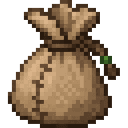
Select the bag and use it (right-click or your usual use-item control) to open it. Keep at least one inventory slot empty: the bag is consumed and its random reward goes directly into your inventory. If your inventory is full, the bag won’t open.
Try upgrading bags as you gather better materials, or craft a Lucky Loot Bag to roll across several reward tiers.
Overview
Loot Bags turn crafting materials into a quick reward roll. Open a bag for one reward, then work toward a higher-tier bag. Openings play a sound, show particles, and display the bag’s rarity and reward in chat.
What It Adds
| Bag | Typical rewards |
|---|---|
| Common | Coal, iron, redstone, lapis, bread, and occasionally gold, diamonds, or XP |
| Rare | Gold, diamonds, emeralds, golden apples, experience bottles, XP, or an enchanted diamond pickaxe |
| Epic | Diamonds, emeralds, gold blocks, golden apples, enchanted diamond gear, netherite scrap, a Totem of Undying, or XP |
| Legendary | Diamonds, emerald blocks, netherite ingots, enchanted gear, an enchanted golden apple, a beacon, a nether star, or XP |
| GODLY | Netherite ingots, diamond blocks, enchanted netherite gear, enchanted golden apples, elytra, beacons, Totems of Undying, or nether stars |
| Lucky | A reward selected from any of the five rarity tiers |
Rewards are random; examples aren’t guaranteed.
How To Use
- Use a Loot Bag from your selected hotbar slot. One bag is consumed per opening, including when opening a stack.
- Rewards are given to your inventory rather than dropped on the ground. Some rolls award XP directly.
- A Luck Booster equipped in your offhand gives a chance to improve your reward to a better-quality reward from that bag’s selected reward pool. It doesn’t change the bag’s rarity, and it only improves a roll when a better reward is available.
- Boosters aren’t consumed when you open bags.
Crafting And Obtaining
All bags are crafted at a crafting table. Common uses paper, string, and an iron ingot; the other recipes are:
| Bag | Ingredients | Recipe |
|---|---|---|
| Rare | Common Loot Bag, gold ingot, lapis lazuli | |
| Epic | Rare Loot Bag, diamond | |
| Legendary | Epic Loot Bag, netherite scrap | |
| GODLY | Legendary Loot Bag, nether star, diamond block | |
| Lucky | Common Loot Bag, gold ingot, emerald, lapis lazuli |
Luck Boosters can drop when non-player entities die. Stronger creatures have better drop odds and can favor stronger boosters. For example, zombies and skeletons have a 3% chance to drop one; a Warden has an 18% chance, a Wither 35%, and the Ender Dragon 50%.
Abilities And Mechanics
There are nine Luck Booster types. Their listed percentage is the chance to improve a bag reward when a better-quality option is available:
| Booster | Improvement chance |
|---|---|
| Common | 5% |
| Uncommon | 10% |
| Rare | 15% |
| Epic | 20% |
| Legendary | 25% |
| Mythical | 30% |
| Secret | 35% |
| Godly | 40% |
| Impossible | 45% |
Equip one in your offhand before opening a bag to use its effect.
Lucky Loot Bags first select a reward pool at random: Common 12%, Rare 23%, Epic 35%, Legendary 22%, or GODLY 8%. Any equipped Luck Booster can then improve the roll within that selected pool.
Progression And Strategy
Start with Common Bags, then use their recipe chain to craft Rare, Epic, Legendary, and GODLY Bags. Save a Lucky Bag for a chance at a high-tier pool without crafting each tier in sequence. For the strongest available Luck Boosters, take on more dangerous creatures—and leave inventory space free before opening bags.
How to install
Download the mod and follow the step-by-step installation guide.
Players also liked

Material Forge Arsenal


Create emerald armor and tools, amethyst armor and tools, obsidian armor and tools, wood armor and tools, dirt armor and tools, and stone armor and tools. Make their protection match their durability and damage and put them where they should be like dirt worst, ex

Minecraft Journey Mode


Utility Item, inspired by Terraria, this item allows you to unlock an endless supply of an item. As well as some other Commands that alter gameplay. You can toggle enemies, switch between gamemodes, enable mayfly, and more. Ideally I made this to play a quasi-Creative/Survival hy…
More weapons
Unleash rune staffs, swift daggers, and deadly scythes, now with fresh textures from wood to netherite

Lava Oneblock Angler


full oneblock but the oneblock is a lava block that u have to fish with an unbreakable fishing rod that you start with make this in a void world with a little platform to stand on while fishing make a nether themed island with a starter chest of 64 food and iron armor and tools a…
This mod is licensed under the CreativeMode Mods License.