

Description
Add handles to copper, iron, golden, diamond, and netherite hammers, then select, save, copy, cut, and paste builds with smart undo and cleaner mass selection.
Mod Wiki
Hammer Of Editing
Quickstart
- Craft a hammer. For a quick start, make a Wood Hammer from planks, an ender pearl, and sticks: . The other hammer recipes are listed under Crafting and Obtaining.
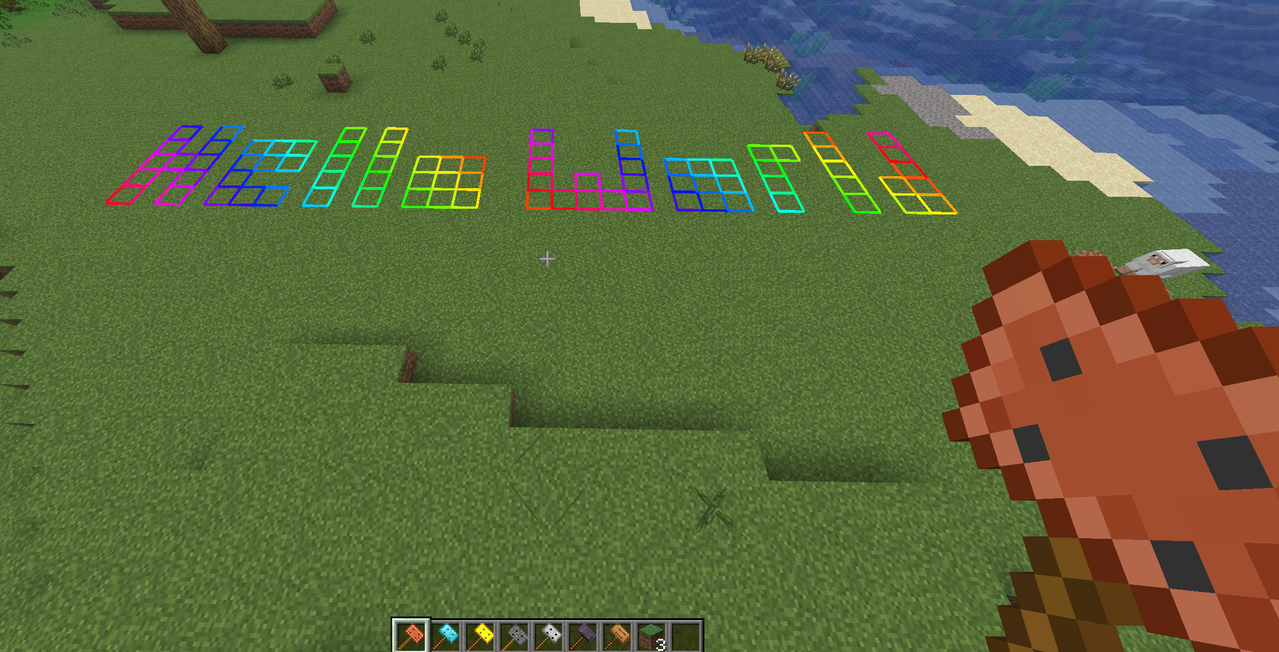
- Hold the hammer in your main hand and right-click non-air blocks to select them. Selected blocks are outlined. Right-click the air to open the formation library.
- In the library, choose Save to store the selection, Copy to store it and immediately prepare repeat-pasting, or Cut to store it and remove it from the world.
- To place a saved formation, select it in the library and choose Paste or Repeat. Aim at a solid block and right-click it: the formation is placed beside the face you click. In Survival, bring the required block items.
With a hammer held, attack to undo the last action; press your Pick Block key to redo. Attacking a block with the hammer triggers undo instead of mining it.
Overview
Hammer Of Editing is a build-editing toolset for selecting blocks, saving layouts, and placing them elsewhere. It adds a formation library, mass selection, and undo/redo controls. The colored outlines show your current selection.
What It Adds
| Item | Use |
|---|---|
| Hammer Handle | Ingredient for the metal hammers |
| Wood Hammer Of Editing | Editing hammer made with planks |
| Stone Hammer Of Editing | Editing hammer made with cobblestone |
| Copper, Iron, Gold, Diamond, and Netherite Hammers Of Editing | Material variants of the editing hammer |
The hammers have durability and are single-stack tools. They’re also available in the Creative inventory’s Tools & Utilities tab.
How To Use
Select blocks
Right-click blocks with the hammer to add them to your selection. Air and most fluid blocks cannot be selected. Open the library by right-clicking the air.
In the library, Clear removes the current selection. A block that is already selected cannot be removed by clicking it again in normal selection mode.
Save, copy, cut, and paste
- Save stores the selection in your library and clears the live selection.
- Copy stores it and arms repeat-paste mode, leaving the original build intact.
- Cut stores it, removes the selected blocks, and gives you their block items. It does not automatically start pasting.
- Choose a formation and press Paste for one placement or Repeat to keep placing it. Right-click a solid block to place beside the clicked face, or right-click the air while aiming at a solid block.
- Stop Paste Mode cancels an active paste.
The library shows each formation’s name, block count, preview, and any missing block items. You can rename, rotate, or delete a saved formation. It holds up to 200 formations.
Mass selection
Open the library and turn Mass on. Right-click a block for the first corner, then right-click another for the opposite corner. The hammer selects eligible blocks inside that rectangular volume. Click an already selected block in this mode to remove it from the selection. Turn Mass off to return to selecting blocks individually.
Template editing
Select a formation and choose Template Paste to place it as a template without consuming block items. While Template mode is active, right-click one of its template blocks with the hammer to open the block picker. Search for a block or enter its block ID, select it, and choose Apply Block.
Use Save Template in the library to save your edited template as a formation. Saving clears the template build from the world; turning Template mode off also clears tracked template blocks, so save first if you want to keep the layout.
Crafting And Obtaining
The handle recipe uses two sticks. Wood and Stone hammers use sticks directly; each metal or gem variant uses a handle. The hammer recipes use an ender pearl in the head.
| Item | Ingredients | Recipe |
|---|---|---|
| Hammer Handle | 2 sticks | |
| Wood Hammer Of Editing | 2 planks, 1 ender pearl, 2 sticks | |
| Stone Hammer Of Editing | 2 cobblestone, 1 ender pearl, 2 sticks | |
| Copper Hammer Of Editing | 2 copper ingots, 1 ender pearl, 1 Hammer Handle | |
| Iron Hammer Of Editing | 2 iron ingots, 1 ender pearl, 1 Hammer Handle | |
| Gold Hammer Of Editing | 2 gold ingots, 1 ender pearl, 1 Hammer Handle | |
| Diamond Hammer Of Editing | 2 diamonds, 1 ender pearl, 1 Hammer Handle | |
| Netherite Hammer Of Editing | 2 netherite ingots, 1 ender pearl, 1 Hammer Handle |
Abilities And Mechanics
- Undo and redo: With the hammer in your main hand, attack to undo; use your Pick Block key to redo. Attacking a block with the hammer does not mine it.
- Survival pasting: The hammer uses available block items for placements. Only air spaces can be filled; occupied spaces are skipped. If you lack materials or some spaces are occupied, the paste may be partial.
- Repeat paste: Repeat mode stays ready for another placement while you have the needed blocks.
- Formation tools: The library provides previews and controls for renaming, rotating, and deleting formations.
Progression And Strategy
Start with a small selection to learn the workflow. Save is best when you want a reusable library entry without preparing a paste; Copy is convenient when you want to duplicate a build right away. Before pasting in Survival, check the library’s missing-block count and bring enough materials. For larger structures, use Mass mode to select a volume rather than clicking each block individually.
How to install
This Java mod can be used on Windows and Mac PCs with the CreativeMode Launcher or any Minecraft launcher of your choice.

1. Download and install the new CreativeMode Launcher

2. Click to play on the top of the screen.

3. That's it — launches instantly. No complicated setup required.
Want to use on a different launcher? Download mod and manually install.
Remixed from
Hammer Of Editing
sugarsniper
Java 26.1
This mod is licensed under the CreativeMode Mods License.