

Description
Teleport endlessly, move very fast and gain massive health with the Crimson Void Pearl only while holding it.
Mod Wiki
Crimson Void Pearl
Quickstart
- Craft the Crimson Void Pearl using the recipe below, or obtain it from the Combat tab in Creative mode.


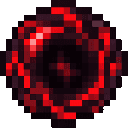
- Hold it in your main hand or off-hand. Simply keeping it in your inventory does not activate its bonuses.
- Right-click to throw it like an Ender Pearl and teleport to where it lands.
- While airborne, press Space once to perform a double jump.
- Throw it repeatedly: the pearl does not run out and has no normal Ender Pearl cooldown.
In Creative mode, you can also use:
/give @s crimson-void-pearl-7vw3coax:crimson_void_pearl_7vw3coax
Overview
The Crimson Void Pearl is a reusable Ender Pearl with powerful movement and survivability bonuses. While held, it grants:
- Instant, repeatable Ender Pearl teleportation
- Very high movement speed
- A single midair double jump
- A massive maximum-health increase
The item stacks up to 16, although throwing it does not consume it.
What It Adds
| Feature | Effect |
|---|---|
| Reusable teleportation | Throw the pearl as often as you like without losing it. |
| No teleport cooldown | Throw another pearl immediately after the previous one. |
| Safe teleportation | The pearl does not deal the usual Ender Pearl damage to its owner. |
| Speed boost | Holding the pearl grants a large movement-speed bonus. |
| Massive health | Holding the pearl increases maximum health by 9,999 health points and fills health to the new maximum when the bonus is first applied. |
| Double jump | Press Space once while airborne to launch upward again. |
How To Use
Teleporting
Hold the Crimson Void Pearl in either hand and right-click. It follows normal Ender Pearl throwing behavior and teleports you when it lands.
You can throw it again immediately. Each throw restores the item if necessary, so the stack remains available for repeated travel.
Double Jumping
With the pearl held in either hand:
- Jump normally.
- While you are still in the air, press Space once more.
- The second press launches you upward and resets your fall distance.
Only one double jump is available per time you leave the ground. Land before using another double jump.
Activating the Bonuses
The health and speed bonuses are active whenever the pearl is in your main hand or off-hand. Switching it out of both hands removes the bonuses.
When the health bonus is removed, any health above your normal maximum is reduced to that maximum.
Crafting And Obtaining
The recipe uses:
- 4 Crying Obsidian
- 4 Redstone Blocks
- 1 Ender Pearl
- 1 Nether Star
The recipe is unlocked when you enter a world. In Creative mode, the Crimson Void Pearl is available in the Combat item group.
Abilities And Mechanics
- The item behaves like an Ender Pearl when thrown.
- Throwing does not permanently consume the pearl, including when using a normal survival-mode stack.
- There is no wait between throws.
- The item must be actively held to grant speed, health, and double-jump abilities.
- Holding it in either hand is sufficient; holding one in each hand does not provide additional bonuses.
- The double jump only works while the player is alive, not in Spectator mode, and not already on the ground.
Progression And Strategy
The Nether Star makes the pearl a late-game mobility item, but its reusable teleportation makes it valuable for exploration, emergency escapes, and crossing dangerous terrain.
Keep it in your off-hand when you want to use another item in your main hand while retaining its movement abilities. For long-distance travel, combine the speed boost with repeated pearl throws, and save the double jump for correcting a landing or escaping a fall.
How to install
This Java mod can be used on Windows and Mac PCs with the CreativeMode Launcher or any Minecraft launcher of your choice.

1. Download and install the new CreativeMode Launcher
2. Click to play on the top of the screen.
3. That's it — launches instantly. No complicated setup required.
Want to use on a different launcher? Download mod and manually install.
Players also liked

Healthiest Show Host


Meet the Bone Meal Emcee, a friendly and energetic show host who has found his way into your Minecraft world! This charismatic skeleton-like character is 15% larger than normal and glows with a subtle stage lighting effect, moving around with the enthusiasm of a true television p…

Inferno Flamebreaker

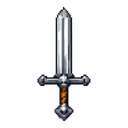
Smash foes from above and unleash blazing fireballs with the Inferno Flamebreaker.

Radiant Orbblade


Wield the Radiant Orbblade, steer blazing light, and purify hostile mobs from afar.
Reelbound


``` 🎣 Reelbound ├── 🪝 Fish with the Signature Fishing Rod │ ├── 🌊 Cast into nearby water │ ├── 🎰 Discover your catch's rarity │ └── ⚔️ Win the combat to reel it in ├── 🐟 40 fish and 6 treasures to discover │ └── 🗺️ Different catches across biomes ├── 📖 Catch encycl…
This mod is licensed under the CreativeMode Mods License.