

Description
Bind elemental crystals for HUD-powered combat, Scourge Tick Freeze, and working cooldowns across all powers
Mod Wiki
Crimson Ascendant
Quickstart
- Get a Crimson Ascendant crystal (the item behind this mod's power system) and right-click it to bind its power to yourself. This consumes the crystal (unless you're in Creative) and awakens your abilities.
- Once bound, use the following keys to fight with your new powers:
- Z — Ability Z (Crimson Bolt)
- X — Ability X (Crimson Vortex)
- C — Ability C (Red Dash)
- V — Ability V (Crimson Rift) — unlocked after evolving
- B — Ultimate (Crimson Storm) — unlocked at higher stages
- N — Evolve your power once you have enough mastery
- M — Open the ability menu to review your current powers and cooldowns
- Watch your HUD: it displays your bound power, current stage, mastery progress, an overuse meter, and live cooldowns for every ability.
- Fight, cast abilities, and land kills to build mastery, then press N to evolve into a stronger stage with more abilities.
- If you ever want to remove someone's (or your own) crystal power, craft a Power Nullifier () or a Power Stripping Bomb () for an area effect.
Overview
Crimson Ascendant turns elemental crystals into a full ability-combat system. Binding a crystal grants a set of combat powers tied to that crystal's element, complete with an on-screen HUD, resource management (mastery and overuse), evolving power stages, and independent cooldowns for every ability. Powers can be stripped away with dedicated anti-power items, and there's also a corrupted "Scourge" path that rejects crystal power entirely in favor of raw physical strength.
What It Adds
Crystals — each crystal binds a distinct elemental power when used:
| Crystal | Notes |
|---|---|
| Crimson Ascendant | The signature crimson power; full ability progression (Z/X/C/V + Ultimate) |
| White Crystal | A "light" power variant with its own tooltip flavor |
| Ember, Tide, Gale, Terra, Frost, Storm, Shadow, Nature, Solar, Void Crystals | Minor elemental crystals, each granting a smaller three/four-ability kit (Z/X/C, and a bonus move once evolved) |
Anti-power items:
- Power Nullifier — strips crystal powers from whoever uses it.
- Power Stripping Bomb — detonates to strip powers from every player in a 10-block radius and knocks back nearby creatures.
- Scourge Disease Injecter — permanently rejects crystal power and instead grants "Scourge" physical abilities (punch, dash, and a powerful slow/freeze effect).
How To Use
- Binding a crystal: Right-click any crystal item to bind its power to your character. You can only hold one active power at a time; using another crystal while already bound (or while "crystal-locked") won't grant a second set of powers.
- Casting abilities: Once bound, your Z/X/C keys (plus V and B once unlocked) trigger your element's abilities. Each ability has its own independent cooldown, shown on the HUD and reflected in the ability menu (M).
- Mastery and evolving: Using abilities and defeating enemies/players builds mastery. When you have enough mastery, press N to evolve to the next stage, unlocking new abilities (like V) and eventually a signature Ultimate (B) for the Crimson power at its final stage.
- Overuse meter: Repeated ability use fills an overuse bar. Managing this bar (letting it drop) is part of playing efficiently — pushing it too far limits your effectiveness, so pace your ability use.
- Death and powers: Your bound power state persists with your character and is affected by death — tooltips note that "powers transfer on death," so be mindful of what happens if you die while empowered.
- Removing powers: Use a Power Nullifier on yourself or a target to strip a bound power, or deploy a Power Stripping Bomb for an area-wide strip (sneak to detonate on yourself, or look at a target point to detonate there).
- Going full Scourge: Using the Scourge Disease Injecter locks you out of crystal powers permanently but grants Scourge-style abilities, including a punch, a dash, and a powerful slowing/freezing effect useful against other players' abilities.
Crafting And Obtaining
- Power Nullifier:
- Power Stripping Bomb: (requires a Power Nullifier as an ingredient)
Crystals and the Scourge Disease Injecter are obtained directly (for example, from Creative inventory or however your world provides them) rather than crafted — simply hold and use them to trigger their effects.
Abilities And Mechanics
- Stages: Powers progress through multiple stages (from a base 3-ability kit up to a fully evolved kit with 5 abilities for major powers like Crimson). Minor crystals cap out at fewer stages and abilities than the signature Crimson power.
- Cooldowns: Every ability (Z, X, C, V, and the Ultimate) tracks its own cooldown in the background; cooldowns shorten somewhat as you reach higher stages, making higher-stage powers noticeably more responsive.
- Overuse: An overuse resource tracks how hard you've been leaning on your abilities; higher stages raise your overuse capacity, letting you chain more actions before needing to ease off.
- Combat bonus: Evolved crystal powers (stage 1 and above) hit harder in melee, rewarding players who commit to leveling up their power rather than staying at the base stage.
- Scourge Tick Freeze: The Scourge path's signature effect is a powerful slow/freeze that can lock down opposing players or mobs, contrasting with the crystal path's more mobile, ability-driven combat.
Progression And Strategy
- Bind a crystal early and focus on using your abilities and securing kills to build mastery quickly.
- Evolve as soon as you're able (N) to unlock stronger abilities, extra ultimate moves, and a permanent melee damage bonus.
- Keep an eye on your overuse meter — spamming abilities without letting it settle will limit how often you can act.
- Carry a Power Nullifier or Power Stripping Bomb if you expect to fight empowered opponents, since these are the only ways to strip an active crystal power from a player.
- Consider the Scourge path as an alternative playstyle: giving up crystal abilities permanently in exchange for strong physical combat tools, including a crowd-controlling freeze effect.
How to install
This Java mod can be used on Windows and Mac PCs with the CreativeMode Launcher or any Minecraft launcher of your choice.

1. Download and install the new CreativeMode Launcher
2. Click to play on the top of the screen.
3. That's it — launches instantly. No complicated setup required.
Want to use on a different launcher? Download mod and manually install.
Players also liked



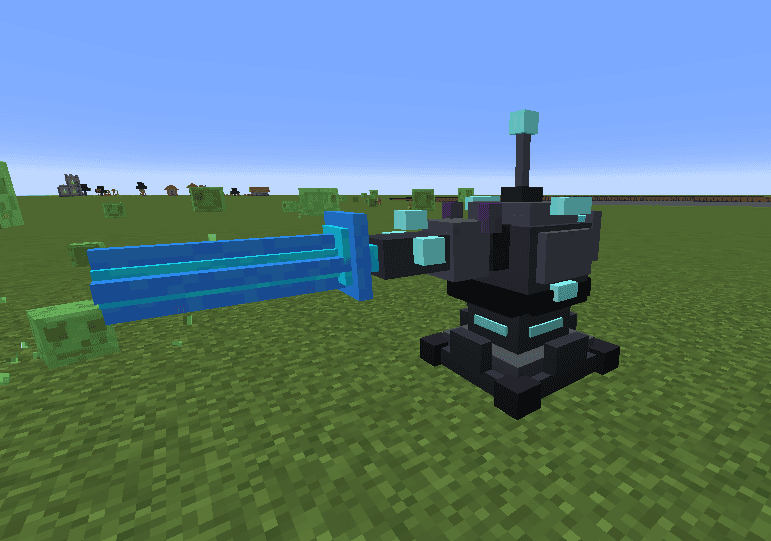
Azure Oblivion Turret


The Turret Block is a powerful automated defense structure that scans for hostile mobs within a 150-block radius and obliterates them with a devastating blue laser beam. When a target is detected, the turret charges for 3 seconds with a spiraling blue particle effect and an escal…
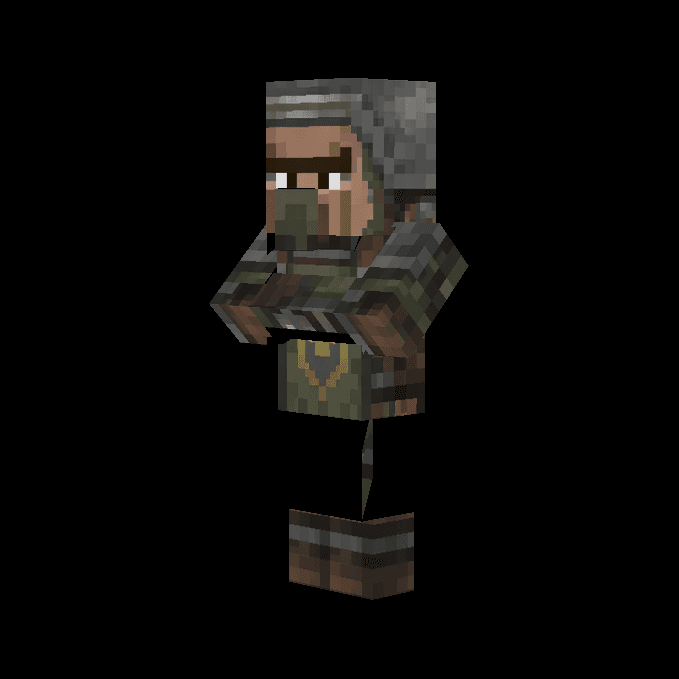


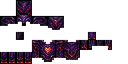
Galaxy Nether Wings Chestplate

Galaxy Nether Wings Chestplate — part of the Galaxy Nether Wings four-piece set: equip it with the matching helmet, leggings, and boots to gain creative-style flight and an extra 10 hearts while the full set is worn. Double-tap the jump key to toggle flight on and off, and removi…

This mod is licensed under the CreativeMode Mods License.