
Description
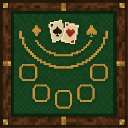
Placeable Blackjack Table: a custom-modeled block that runs an interactive blackjack game—right-click the table to open the betting UI and choose from fixed bet buttons (100, 1,000, 10,000, 100,000 coins); the selected bet is validated against your scoreboard money before the round begins and you are then dealt two cards with on-screen Hit and Stay buttons. The dealer gets two cards and will hit if its total is under 15; the closest total to 21 wins, winning pays 1.5x your bet while losing forfeits the bet, and the result is messaged to you with the amount won or lost.
Mod Wiki
Blackjack Table
Quickstart
- Craft the Blackjack Table at a crafting table using the recipe below, then place it on any solid surface.
- Right-click (interact with) the table to open the betting menu.
- Press one of the four bet buttons — 100, 1,000, 10,000, or 100,000 coins — to place your wager.
- You'll be dealt two cards. Use the Hit button to draw another card or Stay to hold your hand.
- Try to get closer to 21 than the dealer without going over. Results and winnings are shown on screen and in chat.


Note: The coin system uses a scoreboard objective called
money. Make sure your world has this set up (or have an admin run/scoreboard objectives add money dummy) before playing.
Overview
The Blackjack Table adds a fully interactive, placeable casino-style block to your world. Right-clicking it launches a real game of blackjack with a coin-based betting system, custom UI buttons, and sound effects for wins and losses. It's perfect for adventure maps, minigame servers, or just adding some casino flair to a build.
What It Adds
| Content | Description |
|---|---|
| Blackjack Table (block) | A placeable block with a custom appearance. Runs a complete blackjack game on interaction. |
How To Use
Placing the Table
Place the Blackjack Table on top of any solid block. It can only be placed on upward-facing surfaces.
Starting a Game
Right-click the table to open the Blackjack Table betting menu. Your current coin balance is shown, and four bet buttons are available:
| Button | Wager |
|---|---|
| 100 | 100 coins |
| 1,000 | 1,000 coins |
| 10,000 | 10,000 coins |
| 100,000 | 100,000 coins |
If you don't have enough coins for the chosen bet, you'll receive an error message and the betting menu reopens.
Playing a Round
Once a bet is placed, your wager is immediately deducted and the round begins:
- You receive two cards.
- The dealer receives two cards; only the dealer's first card is visible to you.
- Your current hand total is displayed along with your active bet.
During your turn, choose:
- 🟢 Hit — Draw one more card. If your total exceeds 21 you bust and lose the bet immediately.
- 🟡 Stay — Keep your current hand and pass to the dealer.
Reaching exactly 21 automatically ends your turn as a blackjack.
Dealer Logic
After you stay, the dealer reveals their hand. The dealer will keep hitting until their total reaches 15 or higher, then stops.
Abilities And Mechanics
Outcomes
| Result | Condition | Payout |
|---|---|---|
| Blackjack | You hit exactly 21 | 1.5× your bet returned (profit = 0.5× bet) |
| Win | Your total beats the dealer (without busting) | 1.5× your bet returned |
| Push | Tied totals | Your original bet is returned |
| Lose | Dealer total beats yours | Bet is forfeited |
| Bust | Your total exceeds 21 | Bet is forfeited |
- Winnings are automatically added back to your
moneyscoreboard balance. - A sound effect plays at the end of each round — a higher pitch for wins, a lower pitch for losses.
- A summary message in chat shows your final hand, the dealer's full hand, and the coins won or lost.
Progression And Strategy
- Start with smaller bets (100 or 1,000) to build up your balance before risking larger wagers.
- The dealer hits on 14 or less and stands on 15+, so staying on a hand of 15–16 can sometimes pay off.
- Because the dealer's second card is hidden, track the visible card to estimate risk before deciding to hit.
- Breaking the table drops it as an item so you can relocate it freely.
How to install
Download the mod and follow the step-by-step installation guide.
Players also liked
Higher Or Lower Table


Place the "Higher Or Lower" poker table and interact with it to open the betting UI, choose a bid (100, 1,000, 10,000, or 50,000) and pick whether the roll will be higher or lower than 10. The table draws a random number from 1–20: a correct pick wins 1.3× your bet, an incorrect…
Golden Roulette Table
Golden Roulette Table: a placeable interactive block that opens a roulette UI. Players bet using the scoreboard 'money' with options 1000, 5000, 10000, 50000, and 100000. After a bet the player selects 1 of 16 slots; the table randomly selects 3 winning slots (one designated gold…
Bastet


Bastet: a placeable decorative block with an Egyptian-themed texture for use in themed builds.
Black Dragon Hexblade

Wield a dragon-forged black blade that freezes, burns, paralyzes, and poisons foes.
Hozukimaru


This mod brings Ikkaku Madarame’s Zanpakutō: Hozukimaru into Minecraft Bedrock with full Shikai and Bankai transformations, animated weapons, chained polearm mechanics, dragon-themed Bankai, and voice-acted abilities. Features multi-stage weapon forms, realistic polearm combat, a…
This mod is licensed under the CreativeMode Mods License.