

Description
Aim the Atomic Blaster and rain 0-10,000 TNT blocks in a ring or custom shape.
Mod Wiki
Atomic Blaster
Quickstart
- Craft an Atomic Blaster using its automatically unlocked recipe (full recipe below).
- Hold it and hold use (right-click by default) to aim. Point at the spot you want to bombard, then release to fire.
- By default, each shot drops 1,000 TNT in a filled circle. Sneak + use to change the TNT count or drop pattern.
Try the Outer Ring pattern to leave the center open. Use the blaster somewhere you’re prepared to see blown up.
Overview
The Atomic Blaster calls down a configured barrage of primed TNT around the point you aim at. TNT appears above the target and falls before exploding. A shot can contain 0–10,000 TNT; setting the count to 0 disables the barrage.
What It Adds
One configurable weapon with four drop patterns:
| Pattern | Effect |
|---|---|
| Filled Circle | Spreads TNT across a filled circle. |
| Outer Ring | Places TNT around a ring. |
| Square | Spreads TNT across a square grid. |
| Your Drawn Shape | Fills a custom shape drawn in the settings screen. |
How To Use
- Hold use: Raise the blaster and aim. Aiming displays a reticle.
- Release use: Fire toward the point under your crosshair, up to 32 blocks away.
- Sneak + use: Open Atomic Blaster Settings. Enter a TNT count, click the shape button to cycle patterns, then select Apply to save.
- Custom pattern: Left-drag on the drawing canvas to trace a shape. Right-click the canvas to clear it. Draw at least three points for a custom pattern; otherwise, the blaster uses the Filled Circle pattern.
A shot with TNT configured consumes one point of the blaster’s durability. The blaster has 192 durability and a five-second cooldown after firing.
Crafting And Obtaining
The recipe uses iron ingots, a Nether Star, a dispenser, TNT, and redstone:


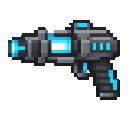
Abilities And Mechanics
The barrage is centered on your aim point and covers an area around it. TNT fuses vary, so the blocks do not all explode at once. The number of TNT per shot and the selected drop pattern are shown in the blaster’s tooltip.
How to install
This Java mod can be used on Windows and Mac PCs with the CreativeMode Launcher or any Minecraft launcher of your choice.

1. Download and install the new CreativeMode Launcher
2. Click to play on the top of the screen.
3. That's it — launches instantly. No complicated setup required.
Want to use on a different launcher? Download mod and manually install.
Players also liked
Giant Tree Homes


A biome three times larger than normal, full of cathedral-like bioluminescent forests, purple-blue treetops, misty cliffs, deeper winding rivers, layered Life blocks and rich ore/blackstone strata hiding massive veins of Life Gem, Sky Sapphire, Sun Ruby and Moon Amethyst; towerin…

Mega Artillery Gun


Place the Artillery Gun as a 16x16x16 multiblock by right‑clicking (it needs clear space and breaking any part of the structure destroys it and returns the single gun item), and throw a Smoke Grenade (right‑click to throw) to call in an artillery strike: each Artillery Gun within…
Incinerator Laser Drill

Item Description: Make a yellow laser cannon that takes 3 seconds to charge a shot and drills through any blocks for 1000 block in a 5 block diameter circle. When charging a shot the player should not be able to move. The sprite should be a large cyberpunk cannon. The cannon shou…
Creative Breaker Blaster


Fire a laser blaster to instantly obliterate any block in survival!
Twin Portal Launcher


The Twin Portal Launcher lets you place two linked two‑block‑tall circular portals on vertical faces up to 100 blocks apart; right‑click to fire a visible orb (~12 blocks/sec) and sneak + right‑click to toggle which color will be placed before firing, with orbs that ignore floors…
This mod is licensed under the CreativeMode Mods License.