

Description
Teleport with the Whiteflame Riftblade and unleash flaming destruction on your enemies.
Mod Wiki
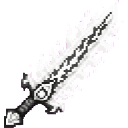
Whiteflame Riftblade
Quickstart
- Craft the Whiteflame Riftblade at a crafting table:


- Put it in your main hand.
- Hold the sneak button and use the blade to teleport toward where you are looking.
- Attack a mob with the blade. A successful hit transforms the target into a destructive flaming blaze.
- Stop sneaking and sneak again before using the teleport a second time.
You can also obtain the blade with:
/give @s com_whiteflame_riftblade_w444jpa4:my_sword
Overview
The Whiteflame Riftblade is an epic, enchanted-looking sword that combines melee combat, teleportation, and destructive fire. While held in your main hand, it surrounds you with white-glowing and flame particles.
Its main abilities are:
- Teleporting toward your crosshair while sneaking
- Transforming struck targets into flaming blazes
- Causing transformed blazes to destroy nearby blocks
What It Adds
| Feature | Effect |
|---|---|
| Whiteflame Riftblade | A powerful sword with 12 attack damage |
| Rift teleport | Teleports you toward the location you are looking at |
| Inferno transformation | Replaces a successfully hit target with a tagged blaze |
| Destructive infernos | Transformed blazes periodically destroy blocks around themselves |
| Whiteflame aura | Displays end-rod and flame particles while the blade is in your main hand |
How To Use
Melee attacks
Equip the Riftblade and attack an entity normally. When the hit takes effect, the target is removed and replaced at the same location by a flaming blaze.
The transformation can affect more than ordinary hostile mobs, so use it carefully around friendly entities and other players.
Teleportation
With the Riftblade in your main hand:
- Look at a destination.
- Hold sneak.
- Use the item once.
If you are looking at a solid, non-passable block within 32 blocks, you teleport to the top of that block. If no suitable block is found, the blade moves you approximately 16 blocks in the direction you are looking.
The blade prevents repeated teleports while sneak is continuously held. Release sneak, then sneak again to activate another teleport.
Destructive blazes
A transformed target becomes a special inferno blaze. Each inferno periodically clears and destroys blocks in an area extending roughly 2 blocks horizontally and from 1 block below to 1 block above its position.
Keep transformed infernos away from bases, farms, chests, and other structures you want to preserve.
Crafting And Obtaining
The Riftblade is crafted at a crafting table using a diamond sword, quartz, a ghast tear, a nether star, and blaze powder.
It can also be found in the Creative inventory under the equipment category or obtained with the item command shown in Quickstart.
Abilities And Mechanics
Riftblade stats
- Attack damage: 12
- Maximum durability: 1,800
- Enchantability: 15
- Rarity: Epic
- Off-hand: Allowed
- Repair material: Diamond
- Repair value: Each diamond restores up to 450 durability
The blade accepts sword enchantments and has a permanent glint.
Main-hand aura
When held in the main hand, the Riftblade produces white end-rod particles and nearby flames. The aura is visual and does not replace the sword's teleport or combat controls.
Inferno behavior
Inferno blazes continue to display flame and white-glowing particles. Their periodic block destruction makes them useful for unleashing chaos in an enemy area, but dangerous to summon near anything valuable.
Progression And Strategy
- Gather Nether and End materials before crafting: ghast tears, blaze powder, and a nether star are required.
- Use the teleport to cross gaps, reach elevated terrain, or close distance with enemies.
- Aim at the top surface of a safe block when you need a controlled landing.
- Re-sneak between teleports instead of holding the sneak button continuously.
- Transform enemies away from important builds so their inferno effect cannot damage your surroundings.
- Carry diamonds to repair the Riftblade and preserve its high durability.
How to install
Download the mod and follow the step-by-step installation guide.
This mod is licensed under the CreativeMode Mods License.