

Description
Wield the Voidfire Scrapblade to unleash devastating, flame-wreathed strikes that send enemies flying.
Mod Wiki
Voidfire Scrapblade
Quickstart
- Open the Combat tab in the Creative inventory and take the Voidfire Scrapblade.
- In Survival, use the automatically unlocked recipe below:


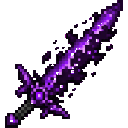
- Equip it in your main hand and attack an enemy.
- Each successful hit sets the target on fire for 8 seconds and knocks it backward.
- For the strongest strike, attack while falling with a full attack cooldown, without sprinting, climbing, swimming, blindness, or a vehicle.
You can also obtain it directly with:
/give @s voidfire-scrapblade-k7majjqm:voidfire_scrapblade_k7majjqm
Overview
The Voidfire Scrapblade is a single-stack combat sword with powerful flame-wreathed attacks. It deals heavy damage, ignites targets, and launches them away from you.
What It Adds
- Voidfire Scrapblade
- Netherite-tier sword
- Cannot be stacked
- Normal hit damage: 24 damage, or 12 hearts
- Critical hit damage: 28 damage, or 14 hearts
- Attack speed: 1.6 attacks per second
- Ignites targets for 8 seconds
- Knocks targets backward on hit
How To Use
Hold the Scrapblade in your main hand and use the normal attack button to strike nearby enemies. Wait for the attack cooldown to recharge before attacking again to deal full damage.
Every successful hit applies the blade’s voidfire effect:
- The target burns for 8 seconds.
- The target is pushed away from the attacker.
- The effect works on ordinary living targets that can be hit by a sword.
The blade uses Minecraft’s standard sword controls and can be used in either Survival or Creative mode.
Crafting And Obtaining
The Scrapblade requires one netherite scrap, one amethyst shard, and one stick. The recipe is shaped vertically, with the netherite scrap above the amethyst shard and the stick at the bottom.
The recipe is made available automatically when you join the world. It is also available in the recipe book once unlocked.
Abilities And Mechanics
Flame-Wreathed Strikes
A successful attack sets the target on fire for 8 seconds, providing additional burning damage and making enemies easier to track in dark areas.
Knockback
Hits push enemies away from you. Use this to create space, interrupt an approaching enemy’s position, or knock targets toward hazards.
Critical Strikes
The Scrapblade deals 28 damage when performing a standard Minecraft critical attack. To qualify, attack while:
- Falling and not standing on the ground
- Not sprinting
- Not climbing
- Not touching water
- Not riding a vehicle
- Not affected by Blindness
- At more than 90% attack cooldown
Otherwise, the blade deals 24 damage on a normal hit.
Progression And Strategy
- Use the knockback to keep melee enemies at a safe distance.
- Let the attack cooldown recharge before striking for reliable maximum damage.
- Attack from a short fall to combine the blade’s high damage with a critical hit.
- Avoid sprinting when attempting critical strikes.
- Use burning targets and knockback together to separate groups of enemies.
- Because the Scrapblade does not stack, reserve an inventory slot for it when preparing for combat.
How to install
This Java mod can be used on Windows and Mac PCs with the CreativeMode Launcher or any Minecraft launcher of your choice.

1. Download and install the new CreativeMode Launcher
2. Click to play on the top of the screen.
3. That's it — launches instantly. No complicated setup required.
Want to use on a different launcher? Download mod and manually install.
This mod is licensed under the CreativeMode Mods License.