

Description
Throw torches to light distant and hard to reach locations.
Mod Wiki
Torch Toss
Quickstart
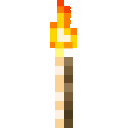
Craft one Torch Toss, hold it, aim at a block where a normal torch can be placed, and right-click to throw. A successful hit places a standard torch; if the torch cannot be placed or hits an entity, it drops nearby for you to pick up.


Overview
Torch Toss lets you light spots at a distance by throwing torches. Each stack holds up to 16.
How To Use
- Aim at a block face that can support a torch, then use the item to throw it.
- A successful hit places a regular torch. Hits on walls place a wall torch when possible.
- If placement fails, or the projectile hits an entity, the thrown item drops nearby and can be recovered.
- Each throw uses one Torch Toss, except in Creative mode.
Crafting And Obtaining
The recipe unlocks when you join a world. You can also find Torch Toss in the Tools and Utilities creative tab.
Recipes

How to install
This Java mod can be used on Windows and Mac PCs with the CreativeMode Launcher or any Minecraft launcher of your choice.

1. Download and install the new CreativeMode Launcher
2. Click to play on the top of the screen.
3. That's it — launches instantly. No complicated setup required.
Want to use on a different launcher? Download mod and manually install.
This mod is licensed under the CreativeMode Mods License.