

Description
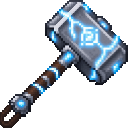
Fly with a mighty hammer, summon lightning, and launch foes with crushing uppercuts.
Mod Wiki
Stormflight Hammer
Quickstart
Craft the hammer using the recipe below, then hold it in your hand. Hold right-click (use) on the ground to launch upward; keep holding it while airborne to fly and boost in the direction you look. While crouching, right-click to call lightning down where you’re aiming. Try hitting an enemy while rising for an uppercut that launches them away.
Overview
The Stormflight Hammer is a single, unstackable weapon built for aerial movement and combat. It combines flight thrust, aimed lightning, and a rising-hit uppercut.
What It Adds
- Flight and boost: Holding use launches you upward from the ground and provides thrust while you’re airborne.
- Lightning strike: Crouch and use the hammer to summon a lightning bolt at the block you’re aiming toward.
- Uppercut: A melee hit while you’re airborne and rising knocks the target upward and away, and gives you a small upward bounce.
How To Use
- Fly: Hold right-click. Look in the direction you want to travel for thrust. Flight thrust pauses while you’re in water.
- Summon lightning: Crouch and right-click while aiming at a block. The strike can reach up to 40 blocks and has a brief cooldown.
- Uppercut: While rising, hit an enemy with the hammer. The launch effect only triggers while you’re moving upward—not while grounded or falling.
Crafting And Obtaining
The hammer is also available in the Combat section of the Creative inventory.
Crafting requires 2 Netherite Ingots, 1 Diamond Block, 2 Lightning Rods, 1 Nether Star, and 1 Elytra:


Abilities And Mechanics
In the main hand, the hammer provides +10 attack damage and -2.4 attack speed. Its rising-hit uppercut adds damage and knockback, launching enemies away from you.
Progression And Strategy
Use the ground launch to get airborne, then keep holding use and steer with your aim. For a strong opening hit, rise toward an enemy and strike before you start falling. Use the lightning strike when you can aim at a block near your target.
How to install
This Java mod can be used on Windows and Mac PCs with the CreativeMode Launcher or any Minecraft launcher of your choice.

1. Download and install the new CreativeMode Launcher
2. Click to play on the top of the screen.
3. That's it — launches instantly. No complicated setup required.
Want to use on a different launcher? Download mod and manually install.
This mod is licensed under the CreativeMode Mods License.