

Description
Slash foes or hurl a lightning bolt with the Stormbolt Sword.
Mod Wiki
Stormbolt Sword
Quickstart
Craft the sword using three sticks, two diamonds, and one copper ingot, or find it in the Creative inventory’s Combat tab. The full recipe is:


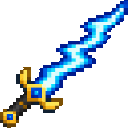
Hold the sword and use it (right-click by default) to hurl it toward where you’re aiming. It calls down lightning where it hits an entity or block. The sword returns to your inventory; you can throw it again after a 15-second cooldown.
Try hitting a mob with a melee attack too: the sword can call down lightning on a successful hit.
Overview
The Stormbolt Sword is a melee weapon and throwable lightning weapon. It deals with foes up close or from a distance, but holding it in either hand continually gives you Slowness I.
How To Use
- Melee: Attack normally with the sword. Each successful hit has a 10% chance to trigger lightning on the target.
- Throw: Use the sword to launch it in your aimed direction. A hit triggers lightning at the impact point; hitting a living target also deals 8 damage from the projectile.
- Wait out the cooldown: Throwing the sword starts a 15-second cooldown. Throwing does not consume the sword.
Crafting And Obtaining
The recipe uses a crafting table and the ingredients shown above. The sword is also available in the Creative inventory’s Combat tab.
Abilities And Mechanics
- Lightning on melee hits: The lightning strike also inflicts Slowness II for 2.5 seconds and Darkness for 1.75 seconds. Mobs affected by the strike attempt to flee.
- Lightning on thrown impact: The projectile sparks as it travels and calls lightning at the point where it hits an entity or block.
- Movement tradeoff: While the sword is in your main hand or offhand, it repeatedly applies Slowness I.
Progression And Strategy
Use melee attacks when you can stay close to a foe, and throw the sword to strike at a distance or around obstacles. Keep in mind that holding it slows your movement, including while you wait for the throwing cooldown.
How to install
This Java mod can be used on Windows and Mac PCs with the CreativeMode Launcher or any Minecraft launcher of your choice.

1. Download and install the new CreativeMode Launcher

2. Click to play on the top of the screen.

3. That's it — launches instantly. No complicated setup required.
Want to use on a different launcher? Download mod and manually install.
This mod is licensed under the CreativeMode Mods License.