

Description
A late-game Stitcher Doll that vacuums loot, boosts you, and stores items forever.
Mod Wiki
Stitcher Doll
Quickstart
- Craft Voodoo Blood at a crafting table. Each recipe produces 2.



- Use Voodoo Blood, a Nether Star, two Totems of Undying, and String to craft the Stitcher Doll.


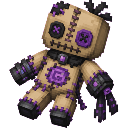
- Equip the Stitcher Doll in your off-hand slot. Its passive abilities only function while it is equipped there.
- Drop items near you, then wait for the doll to vacuum them into its personal storage.
- Use the doll to open its menu. From there, you can view stored loot, withdraw items, or pause and resume auto-vacuum.
With cheats enabled, you can obtain the items directly:
/give @s com_stitcher_doll_vqxp6snu:my_sword/give @s com_stitcher_doll_vqxp6snu:voodoo_blood
Overview
The Stitcher Doll is a late-game off-hand item with three main functions:
- Vacuums nearby dropped items into permanent personal storage.
- Grants defensive and regenerative effects while equipped.
- Tracks successful attacks and periodically gives you a blessing or curse.
The doll stores item quantities rather than physical stacks. Stored items remain available until you withdraw them, and the storage pool has no gameplay capacity cap for normal use.
What It Adds
Stitcher Doll
- Equipment slot: Off-hand
- Maximum stack size: 1
- Durability: 500
- Rarity: Epic
- Protection: 2
- Has an enchanted glint for easy identification.
- Can be repaired with Nether Stars or Bedrock.
Voodoo Blood
Voodoo Blood is the crafting ingredient for the Stitcher Doll.
- Maximum stack size: 64
- Rarity: Rare
How To Use
Equip the Doll
Place the Stitcher Doll in your off-hand slot. The doll's passive effects, auto-vacuum, storage HUD, and hit counter work only while it is equipped there.
Using the doll opens the Stitcher Doll menu, which displays:
- The number of stored item types
- The total number of stored items
- Whether auto-vacuum is active or paused
- Options to withdraw items or change the vacuum setting
Manage Auto-Vacuum
The doll starts with auto-vacuum active. In the Stitcher Doll menu, select:
- Pause auto-vacuum to stop collecting nearby drops.
- Enable auto-vacuum to resume collecting them.
Pausing is useful when you want dropped items to remain in the world for manual pickup or sorting.
Withdraw Stored Items
Choose Withdraw stored items in the Stitcher Doll menu. Select an item type, then enter the amount to withdraw.
- If only one item is stored, it is withdrawn immediately.
- Items are placed directly into your inventory.
- If your inventory cannot hold the entire amount, the rest remains safely stored.
- Stored item types are divided across pages when you have a large collection.
Abilities And Mechanics
Loot Vacuum
While the doll is equipped and auto-vacuum is active, it searches for dropped item entities within 6 blocks of you.
The vacuum:
- Collects all kinds of dropped items.
- Removes the drops from the world and adds their quantities to your personal storage.
- Performs short collection pulses roughly every five seconds.
- Can collect up to eight dropped item entities during an individual pulse.
If a large mob farm produces more drops than one pulse can collect, keep the doll equipped and allow later pulses to gather the remaining items.
Devour Buff
Whenever the vacuum successfully collects loot, you receive:
- Strength I
- Saturation I
These effects last for about 9 seconds and are refreshed whenever the doll successfully devours more dropped items.
Protective Aura
While the doll remains equipped in your off-hand, it continuously refreshes:
- Resistance I
- Regeneration I
Removing the doll from your off-hand stops the aura after the active effects expire.
Stitcher Rolls
Every seven successful hits against mobs or players with health, the doll produces a random roll from 111 to 777.
The result has two parts:
- A roughly 65% chance of a blessing
- A roughly 35% chance of a curse
Higher rolls produce stronger results.
| Roll | Blessing | Curse | Duration |
|---|---|---|---|
| 111–332 | Speed I | Slowness I | 5 seconds |
| 333–554 | Speed I and Strength I | Slowness I and Weakness I | 7 seconds |
| 555–777 | Speed II and Strength II | Slowness II and Weakness II | 9 seconds |
The doll announces the roll in chat and shows the result on your action bar. Dropped items and non-living entities do not count as hits. The hit counter only progresses while the doll is equipped in your off-hand.
Crafting And Obtaining
Voodoo Blood
Craft Voodoo Blood at a crafting table using Rotten Flesh, a Spider Eye, and Redstone. The recipe produces two Voodoo Blood.
Stitcher Doll
Craft the Stitcher Doll at a crafting table using Voodoo Blood, a Nether Star, Totems of Undying, and String.
The Nether Star and Totems of Undying make the doll a late-game item, but its storage and defensive abilities make it especially useful for dangerous expeditions and high-output mob farms.
Progression And Strategy
- Craft Voodoo Blood from Rotten Flesh, Spider Eyes, and Redstone before gathering the late-game ingredients for the doll.
- Keep the doll in your off-hand during combat to build toward Stitcher Rolls while benefiting from Resistance and Regeneration.
- Use it near mob farms so drops are collected without filling your inventory.
- Pause auto-vacuum when you want to inspect or manually handle items on the ground.
- Leave open inventory space before withdrawing large quantities. Any overflow stays in storage, but available space lets you retrieve more at once.
- Watch the action bar for the stored-item count and hit progress.
- Repair the doll before its 500 durability is exhausted. Nether Stars provide stronger repairs than Bedrock.
How to install
Download the mod and follow the step-by-step installation guide.
This mod is licensed under the CreativeMode Mods License.