

Description
Wear a headset to command your towering steel companion, and summon it with a remote.
Mod Wiki
Atom in minecraft
Quickstart
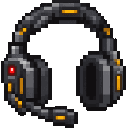
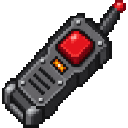
- Craft a Command Headset and Steel Companion Remote (or the matching Shadow versions; recipes are below).
- Equip the headset in your helmet slot, then right-click with its matching remote to deploy your companion in front of you.
- Press T and send a command as a chat message, such as
follow meorwalk. Companion commands are case-insensitive and are handled instead of appearing as normal chat. - To power the companion up or down, sneak and right-click its back, then click POWER UP or SHUT DOWN in the panel.
Overview
The mod lets you direct a towering steel companion with a headset and summon it with a remote. Companions belong to the player who deploys them. They wait for commands rather than wandering or attacking on their own.
The standard and Shadow sets work alike, but each headset controls its matching companion variant.
What It Adds
| Set | Headset | Remote | Companion |
|---|---|---|---|
| Standard | Command Headset | Steel Companion Remote | Steel Companion |
| Shadow | Shadow Command Headset | Shadow Steel Companion Remote | Shadow Steel Companion |
How To Use
Wear the headset that matches the companion you want to command. Send one of the exact phrases below as a chat message:
| Message | What the companion does |
|---|---|
walk | Walks about six blocks in the direction you face. |
jump | Jumps if standing on solid ground. |
follow me | Follows you until told to stop or given another movement command. |
stop | Stops following or other commanded movement. |
jumping strike | Runs forward and leaps into a punch. It needs solid ground to start; a hit on a target in its path deals 8 damage. |
dance | Dances in a circle, jumping as it moves. |
how are you? | Nods in reply. |
lay down | Lowers into rest mode and stops moving. |
get up | Stands up from rest mode. |
power down | Shuts the companion down. Use its back panel to restart it. |
If the companion is lying down, send get up before giving it another command. A powered-down companion cannot follow or take commands.
To use the power panel, sneak and right-click the back of your own companion while nearby. Click the power button to toggle its state, or CLOSE to leave the panel. You can also use the remote again to call an existing nearby companion to follow you; it must be powered on.
Crafting And Obtaining
Use the standard remote with the standard headset, and the Shadow remote with the Shadow headset.
Command Headset


Steel Companion Remote


Shadow Command Headset


Shadow Steel Companion Remote
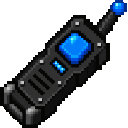
Right-click a remote to deploy its matching companion in front of you. If your matching companion is already nearby, using the remote tells it to follow you instead. A powered-down companion needs to be reactivated at its back panel.
How to install
This Java mod can be used on Windows and Mac PCs with the CreativeMode Launcher or any Minecraft launcher of your choice.

1. Download and install the new CreativeMode Launcher
2. Click to play on the top of the screen.
3. That's it — launches instantly. No complicated setup required.
Want to use on a different launcher? Download mod and manually install.
Players also liked

Iron Man Mod


Repulsor Flight Armor adds a full Iron Man–style armor set: the charged chestplate grants creative‑style flight (press Space to take off), R fires a powerful repulsor beam and X launches explosive rockets, leggings give Speed V and Jump Boost II while sprinting (charged), boots n…

Orbital Railgun Cataclysm

``` Orbital Railgun Cataclysm ├── 🎯 Activation │ ├── ⏱️ 2s charge-up (green energy surge) │ └── 🚀 Launches full 20s orbital sequence │ ├── 🛰️ Phase 1: Target Scan │ ├── 🔄 Rotating white rings (r=30) │ ├── 🌐 Adaptive green laser grid │ └── 📡 Deep hum + radar tones…
This mod is licensed under the CreativeMode Mods License.