

Description
Claim a private bedrock room in Bubble, link doors across dimensions, and send items to its chest.
Mod Wiki
Spatial Pocket Realm Anchor
Quickstart
- Craft a Pocket Realm Anchor:


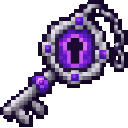

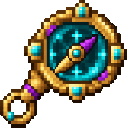
- Right-click with the Anchor to enter your personal room in Bubble. Your arrival location is saved; right-click the Anchor again while in Bubble to return there.
- Look for the chest near your arrival point. To try the door travel, craft a Door Linker, right-click a vanilla door with it, then open that door and walk through.
- To send items to your room, craft a Pocket Item Relay, place it, and drop items on top. The relay sends them to the chest in the room belonging to the player who placed it.
Overview
The mod provides a private, bedrock-lined room for each player in the Bubble dimension. The Anchor is the direct way in and out. Linked doors offer travel between dimensions, and a placed relay routes dropped items to your room’s chest.
What It Adds
| Item or block | Use |
|---|---|
| Pocket Realm Anchor | Enter your Bubble room or return to your saved location. |
| Door Linker | Link a vanilla door outside Bubble to travelers’ personal rooms. |
| Dimension Route Linker | Set a Bubble door’s destination to the Overworld, Nether, or End. |
| Pocket Item Relay | Send dropped items to the placer’s room chest. |
How To Use
Entering and leaving Bubble
Right-click the Pocket Realm Anchor to enter your room. On entry, it records your current dimension and position. While in Bubble, right-click the Anchor again to return to that saved location.
Your room includes a chest near the arrival point. The room is assigned to you, while linked doors can be used by other players to reach their own rooms.
Linking doors to Bubble
Right-click a vanilla door with the Door Linker. Open the linked door and walk through it to enter your personal Bubble room. The same linked door can take different players to their respective rooms.
Routing a Bubble door to a dimension
Use the Dimension Route Linker while inside Bubble:
- Right-click with the linker to cycle through available destinations: the Overworld, Nether, and End.
- Right-click a vanilla door with the linker to bind that door to the selected destination.
- Open the door and walk through to arrive at that dimension’s spawn.
Use the Pocket Realm Anchor to travel between Bubble and the location where you last used it to enter.
Sending items to your chest
Place the Pocket Item Relay in the world and drop items on top of it. It sends them to the chest in the Bubble room of the player who placed the relay. If the chest cannot be reached at the time, items can be held for delivery; items that do not fit remain pending until there is room.
Crafting And Obtaining
Craft the travel and storage items with these recipes:
| Item | Recipe |
|---|---|
| Door Linker | |
| Dimension Route Linker | |
| Pocket Item Relay |
Progression And Strategy
Start by making the Anchor and using your room chest as personal storage. Link a door near a regular base or travel hub for quick access to Bubble. Place relays where you collect or drop items, and leave space in your room chest so deliveries can fit.
How to install
This Java mod can be used on Windows and Mac PCs with the CreativeMode Launcher or any Minecraft launcher of your choice.

1. Download and install the new CreativeMode Launcher
2. Click to play on the top of the screen.
3. That's it — launches instantly. No complicated setup required.
Want to use on a different launcher? Download mod and manually install.
This mod is licensed under the CreativeMode Mods License.