

Description
Place the Redstone Song Block, power it up, and enjoy an extended Creeper Anthem celebration!
Mod Wiki
Sound Powered Block
Quickstart
- Craft a Redstone Song Block at a crafting table:


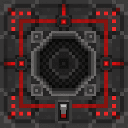
- Place the block in the world.
- Power it with any redstone signal, such as a lever, button, pressure plate, or redstone torch.
- Listen to the default Creeper Anthem. The block plays its selected song at high volume and continues the celebration after power is removed.
- Interact with the block to open its song menu. From there, choose a song, change the playback setting, stop the song, or save a Suno song link.
You can also obtain it in Creative mode from the Construction category or use:
/give @s com_sound_powered_block_uz23llxz:my_block 1
Overview
The Redstone Song Block is a placeable music block controlled by redstone. It contains several packaged songs, with Creeper Anthem selected by default.
Powering the block starts its selected song. Removing power does not stop the music immediately; the song can continue for up to one minute before stopping.
What It Adds
- Redstone Song Block
- Redstone-triggered music playback
- Five selectable packaged songs:
- Creeper Anthem
- Welcome Traveler: Markets of Creep Base X
- The Scourge Virus Still Haunts Our Data Banks
- Insanely Good Song
- Cool Song
- An in-game song selection menu
- Continuous and one-shot playback settings
- A stop-song control
- A field for saving a Suno song link
How To Use
Place and Power the Block
Place the Redstone Song Block like any full-sized building block. Connect it to a redstone signal and activate the signal.
The block detects whether it has redstone power:
- When powered, it begins playing the selected song.
- A short pulse from a button or similar source can still start the music.
- When power is removed, playback can continue for up to one minute.
- Powering the block again during the tail period keeps the music active.
Open the Song Menu
Interact with the block to open the Redstone Song Block menu. Normal and sneaking interactions both open the same menu.
The menu shows:
- The currently selected song
- The playback setting
- Any saved Suno request
Select a song to make it the block’s new selection. If the block is already playing, the new selection starts immediately.
Stop Playback Manually
Choose Stop this block's song in the menu to stop the current playback immediately.
Powering the block again starts the currently selected song.
Crafting And Obtaining
Craft the block at a crafting table using:
- 6 Note Blocks
- 1 Jukebox
- 1 Redstone
The block is also available in the Creative inventory under Construction.
Breaking the placed block returns a Redstone Song Block item.
Abilities And Mechanics
Packaged Songs
The block plays songs included with the mod. Its default selection is Creeper Anthem, and playback is configured for an extended looping performance.
The block throttles repeated triggers so that rapid redstone changes do not constantly restart the audio.
Playback Setting
The menu includes a Playback mode button that switches between:
- Continuous
- One-shot
The block’s standard powered behavior is its extended looping music mode. Use the setting to configure the playback preference shown for that block, and use Stop this block's song whenever you want a predictable manual cutoff.
Suno Links
The menu includes Enter a Suno link. Enter a link in this format:
https://suno.com/s/songID
The link is saved as a request on that particular block. Bedrock cannot stream audio directly from an external website, so the saved link does not replace the block’s packaged songs. When powered, the block continues to use the selected in-game song.
Progression And Strategy
- Craft several blocks and give each one a different song for themed rooms or event areas.
- Use a lever when you want direct control over a long performance.
- Use a button for a quick trigger—the extended unpowered tail lets the song continue after the button resets.
- Place blocks in separate areas and select different songs for each location.
- Use the manual stop option to end a celebration before the one-minute unpowered tail expires.
How to install
Download the mod and follow the step-by-step installation guide.
This mod is licensed under the CreativeMode Mods License.