


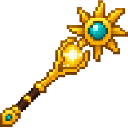
Description
Wield the Solar Dragonstaff and unleash lasers and devastating dragon strikes.
Mod Wiki
Solar Dragonstaff
Quickstart
- Obtain the staff from the Equipment section of the Creative inventory, or use:
/give @s com_solar_dragonstaff_helmgg7e:my_sword 1 - Equip the Solar Dragonstaff in your hand.
- Use or hold the use button to fire its solar laser. It requires no ammunition and reaches up to 48 blocks.
- For a dragon strike, crouch and hit a nearby entity with the staff. A dragon appears above the area in front of you, dives after 2 seconds, and devastates nearby non-player entities.
You can also craft one at a crafting table:
Overview
The Solar Dragonstaff is a powerful melee weapon with two abilities:
- A long-range solar laser.
- A crouch-triggered dragon strike activated by successfully hitting an entity.
It is a single, non-stackable item with 800 durability.
What It Adds
| Feature | Effect |
|---|---|
| Solar laser | Fires an instant beam up to 48 blocks, dealing 15 damage |
| Dragon strike | Summons a diving Ender Dragon that deals 100 damage to nearby non-player entities |
| Melee attack | Deals 10 base damage |
| Durability | 800 durability |
| Enchanting | Uses sword enchanting rules |
How To Use
Solar Laser
Hold the Solar Dragonstaff and press its use control. The staff fires a solar-colored beam instantly along your line of sight.
- The laser does not consume ammunition.
- Each use activation fires one shot.
- The maximum range is 48 blocks.
- A shot deals 15 damage to the first valid damageable entity in its path.
- The staff can fire again after a short delay.
Aim at hostile mobs or other damageable entities before using the staff. The beam does not create a traveling projectile.
Dragon Strike
The dragon strike requires all of the following:
- Hold the Solar Dragonstaff.
- Crouch or sneak.
- Hit an entity with the staff’s melee attack.
A successful trigger summons an Ender Dragon approximately 8 blocks ahead and 28 blocks above you. After about 2 seconds, it dives to the target area.
The impact:
- Deals 100 damage to nearby non-player entities within 20 blocks.
- Does not damage players.
- Removes the summoned dragon shortly after the impact.
- Has a 3-second cooldown.
Simply crouching, carrying the staff, or swinging without hitting an entity does not trigger the dragon strike.
Crafting And Obtaining
Craft the Solar Dragonstaff at a crafting table using:
- 1 Gold Block
- 2 Prismarine Crystals
- 1 Nether Star
- 1 Blaze Rod
The staff can also be obtained directly from the Creative inventory or with the item command shown in the Quickstart section.
Abilities And Mechanics
Melee Combat
The staff deals 10 base melee damage and can be enchanted using sword enchantments. Its maximum durability is 800, so melee attacks and other uses will eventually wear it down.
Laser Combat
The laser is best used for picking off targets at a distance. It travels along your view direction and strikes the first valid damageable entity it encounters, making accurate aiming important when enemies are grouped together.
Dragon Strike Area Damage
The dragon strike is most effective against groups of mobs. Face the area you want to attack before making the crouching melee hit, since the dive target is determined from your position and view direction.
Progression And Strategy
- Use the laser to weaken or eliminate dangerous enemies before they reach melee range.
- Save the dragon strike for dense groups or powerful non-player targets.
- Keep a target close enough to hit when activating the dragon strike; crouching alone is not sufficient.
- Back away after triggering the strike so you can take advantage of its delayed area impact.
- Watch the staff’s durability during extended fights and replace or repair it when necessary.
How to install
Download the mod and follow the step-by-step installation guide.
This mod is licensed under the CreativeMode Mods License.