Description


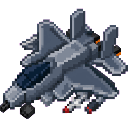
The Skystrike Raptor is a rideable F-22-style fighter jet that lets you tear across the sky, engage targets with three distinct weapon systems, and land safely on demand. Once placed and boarded, it flies under your direct control with a built-in HUD keeping you informed of speed, altitude, and current armament at all times.
| Content | Description |
|---|---|
| Skystrike Raptor | A large multi-block fighter jet you can ride, pilot, and weaponize |
| Vehicle HUD | On-screen overlay showing speed, altitude, weapon mode, and control hints |
| Jet Engine Sound | Custom engine audio plays while the vehicle is active |
Place the Skystrike Raptor on flat ground and right-click it to board. The camera automatically switches to third-person view so you can see the full aircraft. The jet lifts off immediately upon mounting — no runway needed.
| Input | Action |
|---|---|
| Mouse | Steer (yaw and pitch) |
| W | Increase throttle (up to max cruise speed) |
| S | Decrease throttle (minimum cruise speed maintained) |
| Ctrl | Dismount safely |
The jet holds its current cruise speed automatically — you do not need to hold W continuously once you reach your desired speed. Releasing both W and S keeps the aircraft flying at the last set throttle level. A small gravity tug applies when unpowered, so maintain throttle to stay level.
Exhaust smoke particles trail behind the aircraft while a pilot is aboard.
While riding, a status bar appears across the top of your screen:
| Indicator | Meaning |
|---|---|
| SPD | Current speed as a percentage of maximum |
| WPN | Active weapon mode (GUN / MISSILE / BOMB) |
| ALT | Current altitude (Y coordinate) |
A targeting bracket is also drawn at the center of the screen to help aim weapons.
Press Ctrl to exit the aircraft. Shift (sneak) does not dismount the Raptor — use Ctrl exclusively to avoid accidental ejection during combat.
The recipe is automatically granted to every player upon joining the world, so it appears in your recipe book immediately.
The recipe yields 1 Skystrike Raptor item. The item can be found in the Functional Blocks creative tab as well.
Press R to cycle through three weapon modes. Right-click to fire the currently selected weapon.
| Mode | Projectile | Effect |
|---|---|---|
| GUN | Rapid high-damage projectiles | Fast stream of direct-fire shots; short cooldown |
| MISSILE | Explosive fireball | Launches a fireball in your look direction; deals blast damage |
| BOMB | TNT-strength explosion | Detonates directly beneath the aircraft; effective against ground targets |
Weapons fire in the direction you are looking. All three modes have a fire cooldown to prevent spam.
This Java mod can be used on Windows and Mac PCs with the CreativeMode Launcher or any Minecraft launcher of your choice.

1. Download and install the new CreativeMode Launcher

2. Click to play on the top of the screen.
3. That's it — launches instantly. No complicated setup required.
Want to use on a different launcher? Download mod and manually install.
This mod is licensed under the CreativeMode Mods License.

