


Description
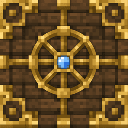
Place a wheel to lift and steer your build forward, back, left, and right.
Mod Wiki
Skyhelm Steering
Quickstart
- Craft a Skyhelm Steering Wheel using the recipe below.
- Place it on top of, or attached to, the build you want to fly — a boat, platform, floating base, anything made of blocks.
- Right-click the wheel to engage flight. The mod will scan for all blocks connected to the wheel and lift them off the ground.
- Stand still to rise, or move forward, backward, left, or right to steer the whole attached structure in that direction.
- Right-click the wheel again to stop the flight and set the structure back down.
Overview
Skyhelm Steering lets you turn any block structure into a flying craft. Build something out of ordinary blocks, place a Steering Wheel somewhere on it, and activate the wheel to lift the entire connected structure into the air. Steer it around like a vehicle, then land it whenever you like.
What It Adds
- Skyhelm Steering Wheel — a placeable block that acts as the control point for flight. Found in the Functional items group in the creative menu.
How To Use
- Attach it to a structure: The wheel must be touching other blocks. When activated, it searches nearby connected blocks (up to a decent radius and block count) and treats them as one craft.
- Engage flight: Right-click the wheel. If it finds an attached structure, it lifts off and you'll see a message confirming how many blocks are part of the craft.
- Steer: While flying, use your normal movement controls:
- Move forward/back/left/right to push the craft in that direction.
- Stand still (no movement input) to make the craft rise.
- Land / stop: Right-click the wheel again to disengage. The craft stops moving and settles.
- No structure found: If the wheel isn't touching any blocks, right-clicking it will tell you no attached craft was found — build something around or under the wheel first.
Crafting And Obtaining
Craft the Steering Wheel using sticks, iron ingots, oak planks, and redstone:
Abilities And Mechanics
- Structure detection: Activating the wheel scans outward from its position to find all connected blocks, up to a limited size. Very large builds beyond that limit won't be fully captured.
- Altitude limit: Crafts can only rise so high above their starting point before leveling off.
- Movement: Steering direction is based on where you're looking/moving relative to the wheel — small movement inputs below a certain threshold are ignored so the craft won't drift from tiny nudges.
- Multiple wheels: Each Steering Wheel manages its own flight session independently, so different builds with their own wheels can fly separately at the same time.
Progression And Strategy
- Build compact, connected structures — the wheel only lifts blocks that are physically touching each other and eventually connect back to it.
- Keep your craft within the detection range and block limit so the whole structure lifts together; stray or disconnected pieces will be left behind.
- Use the wheel as both your control panel and takeoff point — position it somewhere convenient to reach while flying, since you'll return to it to land.
How to install
This Java mod can be used on Windows and Mac PCs with the CreativeMode Launcher or any Minecraft launcher of your choice.

1. Download and install the new CreativeMode Launcher
2. Click to play on the top of the screen.
3. That's it — launches instantly. No complicated setup required.
Want to use on a different launcher? Download mod and manually install.
This mod is licensed under the CreativeMode Mods License.