

Description
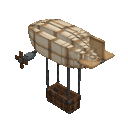
Take to the skies in your own zeppelin and explore the world from above.
Mod Wiki
Skybound Zeppelin
Quickstart
- Get the Skybound Zeppelin placer from Creative inventory, or craft one using the recipe below.
- Hold the placer and use it on a block in an open area. The zeppelin appears beside the block, and you mount it automatically. The placer is not consumed.
- Steer with your usual movement and look controls to explore from the air. Sneak/crouch to dismount; interact with the zeppelin to ride again.
Overview
Skybound Zeppelin adds a rideable flying vehicle for exploring the world from above. It flies without gravity and has a single seat.
What It Adds
- Skybound Zeppelin: A player-controlled flying vehicle.
- Zeppelin placer: A reusable item that spawns the vehicle when used on a block.
How To Use
While riding, use your normal movement and steering controls to guide the zeppelin. Your view switches to third person; your armor and held item are temporarily hidden and return when you dismount.
Crafting And Obtaining
Craft the placer at a crafting table:


Abilities And Mechanics
The zeppelin is for travel and has no weapon. The mounted Tap/Jump action does not fire an attack.
How to install
Download the mod and follow the step-by-step installation guide.
This mod is licensed under the CreativeMode Mods License.