

Description
Ride a hovering board and soar freely through the skies like Creative mode.
Mod Wiki
Skybound Hoverboard
Quickstart
- Open the Creative inventory and find Skybound Hoverboard in the Items category.
- Select it and use it on the ground to place the hovering board.
- Interact with the placed board to ride it.
- Use your normal movement controls to steer through the air. The board has no gravity, so you can soar freely instead of staying on the ground.
- Crouch to dismount.
You can also craft one at a crafting table:


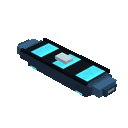
While riding, tapping/use or pressing Jump activates the board’s primary action. The hoverboard has no weapon or additional attack attached to this action.
Overview
Skybound Hoverboard adds a single-seat, rideable hovering board. It is designed for free aerial travel, giving you Creative-style mobility while riding in Survival or other game modes.
The board:
- Floats without gravity.
- Supports one player.
- Can be steered while airborne.
- Can travel over water and through open skies.
- Has 40 health.
- Can be pushed and moved by pistons.
What It Adds
Skybound Hoverboard
The Skybound Hoverboard is both the item used to place the board and the name of the rideable vehicle. Place it in the world, then interact with the board to mount it.
Only players can ride it, and it has one seat.
How To Use
Placing the board
Hold the Skybound Hoverboard item and use it where you want the board to appear. Place it in an open area so there is room to mount and move.
Riding
Interact with the placed board to sit on it. Once mounted, look in the direction you want to travel and use your usual movement controls to steer.
Because the hoverboard has no gravity, it remains airborne and can glide freely through the sky. Its air movement is strongest when moving forward; reversing is slower.
Dismounting
Crouch to leave the board. You will dismount on top of the hoverboard.
Primary action
Tapping/use or pressing Jump while mounted triggers the board’s primary action. On the Skybound Hoverboard, this is simply a ride interaction and does not fire a projectile or perform an attack.
Crafting And Obtaining
Craft the Skybound Hoverboard at a crafting table using the displayed recipe:
The recipe uses iron, a feather, redstone, a diamond, and a stick. The resulting item does not stack, so each board occupies one inventory slot.
In Creative mode, the item is available directly in the Items category.
For command-based testing, you can give yourself the item with:
/give @s com_skybound_hoverboard_syxyz5zu:my_vehicle_placer
You can also summon the placed board directly:
/summon com_skybound_hoverboard_syxyz5zu:my_vehicle
Abilities And Mechanics
- Gravity-free flight: The board does not fall, allowing sustained aerial travel.
- Air steering: Movement controls work while airborne.
- Single rider: Only one player can occupy the seat.
- Open-world travel: The board can move over water and navigate from the air.
- Damage resistance: The board has 40 health, but it is still a physical entity that can be pushed.
- Safe dismounting: Crouching places you on top of the board when you leave it.
Progression And Strategy
Craft the board once you have access to a diamond, then use it to scout large areas, cross oceans, inspect builds from above, or reach high locations without constructing ladders or towers.
For the smoothest flight:
- Place the board in a clear area before mounting.
- Start in open terrain while learning its movement.
- Use forward movement for efficient travel.
- Keep landmarks in view when exploring from high altitude.
- Dismount over a safe surface when you are finished riding.
How to install
Download the mod and follow the step-by-step installation guide.
This mod is licensed under the CreativeMode Mods License.