

Description
Run a colorful Rubik’s cube shop and check out customers at its six-digit display.
Mod Wiki
Six Digit Cube Checkout
Quickstart
- Gather redstone lamps, redstone, a chest, and iron ingots.
- Craft the checkout at a crafting table using this recipe:


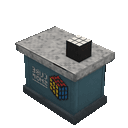
- Place the Six Digit Cube Checkout item where you have room for a 2×2×2 structure. It assembles automatically and faces the direction you place it.
- Build a colorful cube shop around the fixture and use it as a checkout display for roleplay.
Overview
Six Digit Cube Checkout is a colorful, Rubik’s-cube-themed shop fixture with a six-digit display. The checkout is a placeable structure rather than an item to equip.
How To Use
Place the checkout in an open area so its full structure has room to form. Its orientation follows the direction you place it.
The fixture works as a visual shop display. It has no separate customer, payment, or number-setting controls to operate after placement; you can use it as part of a player-run shop or roleplay setup.
How to install
Download the mod and follow the step-by-step installation guide.
This mod is licensed under the CreativeMode Mods License.