Description


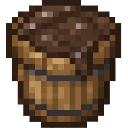
For quick testing, you can use:
/give @s com_sinking_mud_bucket_eief2s7m:mud_bucket
Sinking Mud Bucket adds a craftable Mud Bucket that pours a special, non-solid Sinking Mud block. Players can dive into the mud, descend slowly, and earn another Mud Bucket by completing an 8-second dive.
Hold a Mud Bucket and use it on a block. The space directly above the targeted block must be empty. If it is occupied, the bucket cannot pour and remains in your inventory.
When placement succeeds:
The Mud Bucket does not stack, so each bucket occupies its own inventory slot.
Step into a Sinking Mud block to begin a dive. While you are inside or passing through the mud:
Move out of the Sinking Mud to end the dive. The timer resets when you leave.
Remain in the Sinking Mud for at least 8 seconds, then exit it. A Mud Bucket appears at your current location and a success message is displayed.
Leaving before 8 seconds ends the attempt without a reward. You can immediately try another dive.
Craft the Mud Bucket in a crafting table with:
Both ingredients must be available before the recipe unlocks. Mud Buckets can also be obtained from the Creative inventory.
Sinking Mud is available in the Creative inventory under the nature category. You can also obtain it with:
/give @s com_sinking_mud_bucket_eief2s7m:sinking_mud
Breaking Sinking Mud drops Sinking Mud.
The action bar displays information in this format:
SINKING: current time | Reward in remaining time | Best: best time
The current dive time and depth score reset when you leave the mud. Your best time is retained as your personal record, even after a dive ends.
Place Sinking Mud in a vertical column or pit to create a longer dive. Multiple blocks give you more room to descend before reaching solid ground. Leave an opening or clear route so you can escape after completing the timer.
Download the mod and follow the step-by-step installation guide.
This mod is licensed under the CreativeMode Mods License.

