

Description
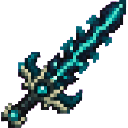
Tear through space-time with a sculk-forged sword and unleash a devastating three-slash combo.
Mod Wiki
Sculk Riftcutter
Quickstart
- Craft the Sculk Riftcutter at a crafting table, or find it in the Creative inventory under Equipment.
- Equip it in your main hand.
- Face an entity and attack it once.
- Stay near the target to let the entire three-slash combo land.
You can also obtain it with:
/give @s com_sculk_riftcutter_nzswjop6:my_sword
Overview
The Sculk Riftcutter is a sculk-forged sword with a powerful follow-up attack. A successful hit triggers two horizontal rift slashes and a final downward strike around the target.
It is a single-stack weapon with:
- 8 base attack damage
- 1,561 durability
- Sword enchantment compatibility
- A three-slash attack sequence triggered by hitting an entity
What It Adds
Sculk Riftcutter
The sword’s normal attack is enhanced by a timed combo:
| Strike | Damage | Effect |
|---|---|---|
| First rift slash | 3 | Horizontal area strike |
| Second rift slash | 4 | Wider horizontal area strike |
| Final rift strike | 6 | Strikes from above and drives targets downward |
The follow-up strikes can damage nearby entities around the original target, not just the entity you initially hit.
How To Use
Hold the Sculk Riftcutter and attack an entity. The combo starts automatically when the hit connects; there is no additional key or button to press.
For the best results:
- Face toward the target when attacking.
- Remain close enough for the target to stay within the follow-up strike areas.
- Avoid attacking repeatedly during an active combo. A new combo cannot begin until the current sequence finishes.
- Be careful around friendly entities, since the area strikes damage nearby entities other than you.
The three strikes land in quick succession over roughly eight game ticks. The final strike is centered above the target and applies a downward knockback effect.
Crafting And Obtaining
Craft the sword at a crafting table using one Echo Shard, one Sculk Catalyst, and one Stick:


The ingredients are arranged vertically:
- Echo Shard at the top
- Sculk Catalyst in the middle
- Stick at the bottom
In Creative mode, the item is available in the Equipment category.
Abilities And Mechanics
Automatic Three-Slash Combo
The first successful hit starts the Riftcutter sequence:
- A 3-damage horizontal slash lands near the target.
- A 4-damage horizontal slash follows with a slightly larger area.
- A 6-damage strike lands from above and knocks nearby targets downward.
If one target remains inside all three areas, it can take up to 13 additional combo damage, in addition to the sword’s normal attack damage.
Combo Timing
Only one sequence can be active for each attacker at a time. Wait for the combo to finish before trying to start another one. Hits made during the active sequence do not stack additional Riftcutter combos.
Durability And Enchanting
The Sculk Riftcutter has 1,561 durability and can be enchanted as a sword. It does not stack, so each sword occupies its own inventory slot.
Progression And Strategy
The Riftcutter is especially useful when several entities are grouped near your target. Begin the attack from the edge of a group, aim toward the center, and let the area strikes reach surrounding targets.
Use the first hit to start the combo rather than immediately retreating. The final overhead strike is useful for disrupting enemies by pushing them downward, but keep allies and other valuable entities away from the target area.
Recipes


How to install
Download the mod and follow the step-by-step installation guide.
This mod is licensed under the CreativeMode Mods License.