


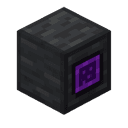
Description
Your pocket dimension survives death, keeping your chamber and its secrets intact.
Mod Wiki
Scattered Chambers
Quickstart
- Craft the Scattered Chambers item using the recipe below.
- Right-click (use item) while holding it to open your personal Pocket Dimension for the first time. This creates your chamber and teleports you inside.
- Right-click again while inside your chamber to leave and return to the exact spot you left from.
- Keep the item in your inventory — it remembers your chamber's location and survives death, so you'll never lose access to your personal space.
Overview
Scattered Chambers gives every player their own private pocket dimension, accessible at any time through a single portable item. Each player who uses the item is assigned a permanent, isolated chamber inside the world — a personal getaway that stays with you even if you die.
What It Adds
- Scattered Chambers — a single-use-per-player teleportation item that opens and closes access to your personal pocket dimension.
- A hollow, enclosed 50×50×50 chamber generated for each player the first time they use the item.
- Death-proof chamber ownership: the item and its saved location data are preserved through death instead of being dropped or lost.
How To Use
- Entering your chamber: Use (right-click) the Scattered Chambers item while out in the normal world. The first time you do this, a chamber is generated for you at a unique, permanent location. You'll hear a teleport sound and be dropped into the center of your new space.
- Leaving your chamber: Use the item again while inside your chamber to return to the exact position and world you teleported from.
- Staying inside your chamber: The chamber is fully enclosed by barrier walls. If you somehow end up near the edge, you'll be automatically pulled back to the center — you cannot leave the chamber except by using the item.
- Surviving death: If you die while carrying the Scattered Chambers item, it is protected from being dropped as a death item. It reappears safely in your inventory after you respawn, still linked to your existing chamber.
Crafting And Obtaining
Craft the item using ender pearls, obsidian, chorus fruit, and a diamond, as shown above. Only one Scattered Chambers item can be held at a time (it does not stack), since it holds your personal chamber location.
The item is a valued trade good to piglins and cannot be repaired at an anvil or grindstone (this doesn't matter much since it doesn't take durability damage from normal use).
Abilities And Mechanics
- Permanent assignment: The very first time you use the item, the game permanently reserves a spot for you among all players who have created chambers, spacing chambers out around the world so they don't overlap.
- One chamber per player: Your chamber location is stored on the item itself. If you lose the item without dying (for example, by dropping or trading it away), whoever holds it can access whichever chamber is bound to it.
- Chamber boundaries: Chambers are large enclosed cubes — plenty of room to build a private base, but you're always kept within its walls while inside.
Progression And Strategy
Craft a Scattered Chambers item early to secure a permanent, safe base that no other player can invade or destroy accidentally, since it exists in its own isolated space. Use it as a secure storage or crafting retreat, a safe respawn-adjacent hideout, or simply a private builder's canvas — all guaranteed to survive your character's death.
How to install
This Java mod can be used on Windows and Mac PCs with the CreativeMode Launcher or any Minecraft launcher of your choice.

1. Download and install the new CreativeMode Launcher

2. Click to play on the top of the screen.

3. That's it — launches instantly. No complicated setup required.
Want to use on a different launcher? Download mod and manually install.
Remixed from
Endless Chamber
zachrl
Java 1.21.5
This mod is licensed under the CreativeMode Mods License.