

Description
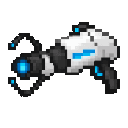
Fire the Rift Gun twice to link portals, then step through for instant travel.
Mod Wiki
Rift Gun
Quickstart
Craft a Rift Gun using the recipe below, then hold it and aim at a block within 64 blocks. Use the item to place Rift A on the block face you’re targeting. Aim at another block in the same dimension and use it again to link Rift B. Walk into either rift to travel to the other.
Overview
The Rift Gun creates a pair of linked, visible rifts for player travel. Each player has their own pair.
What It Adds
- Rift Gun: A single-item tool for placing and linking rifts. It appears in the Combat creative inventory tab.
How To Use
- Use the Rift Gun while targeting a block to open Rift A.
- Use it again while targeting another block in the same dimension to open Rift B.
- Walk into either rift to teleport to the other. You arrive just beyond the destination’s block face.
- Move clear of both rifts before trying to travel again.
Both rifts must be in the same dimension. Firing after a pair is linked starts a new pair at your target, replacing the previous one.
Crafting And Obtaining
Craft one Rift Gun in a crafting table:


Abilities And Mechanics
Rifts appear at the targeted block faces with portal particles and sounds. The gun must hit a block to place a rift; targeting air or an entity won’t open one. Teleporting is triggered by walking into a linked rift.
How to install
This Java mod can be used on Windows and Mac PCs with the CreativeMode Launcher or any Minecraft launcher of your choice.

1. Download and install the new CreativeMode Launcher
2. Click to play on the top of the screen.
3. That's it — launches instantly. No complicated setup required.
Want to use on a different launcher? Download mod and manually install.
Ported from

Rift Gun
FrozenEcho
Java 1.21.5
This mod is licensed under the CreativeMode Mods License.