

Description
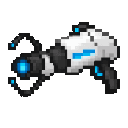
Fire the Rift Gun twice to link portals, then step through for instant travel.
Mod Wiki
Rift Gun
Quickstart
- Craft the Rift Gun using the recipe below, then hold it.
- Aim at a block face where you want the first rift and use the item.
- Aim at another block face in the same dimension and use it again to link the rifts.
- Walk into either rift to travel to the other. Leave the destination rift before trying to travel back.
Overview
The Rift Gun creates two linked travel points for you. Aim at blocks to place them; no portal frame is needed. The rifts work only between locations in the same dimension.
What It Adds
- Rift Gun: A single, non-stackable item that places and links rifts.
How To Use
Use the Rift Gun while aiming at a block within about 64 blocks. It places a rift on the face you hit. Aiming at air or an entity does not place one.
Your first use opens Rift A; your next use places Rift B and links the pair. Walk into either rift to travel. To relocate the pair, fire once to start a new Rift A, then fire again to place Rift B.
Crafting And Obtaining
Craft the Rift Gun at a crafting table:


Abilities And Mechanics
- Both rifts must be in the same dimension. Firing in a different dimension starts a new Rift A there.
- You arrive just outside the destination rift’s block face. Choose faces with clear space in front so you have room to emerge.
- After teleporting, move away from the rift before entering one again.
Progression And Strategy
Place the rifts on accessible block faces with safe, open space at both ends. Test the route by walking through, then adjust the pair by firing twice at new locations.
How to install
This Java mod can be used on Windows and Mac PCs with the CreativeMode Launcher or any Minecraft launcher of your choice.

1. Download and install the new CreativeMode Launcher
2. Click to play on the top of the screen.
3. That's it — launches instantly. No complicated setup required.
Want to use on a different launcher? Download mod and manually install.
This mod is licensed under the CreativeMode Mods License.