

Description
I want a mod that adds the new throwing disks Minecraft announced that were being added into Minecraft, and I want to add iron, diamond, copper, and netherite tiers to it. and make it so that they can bounce off walls. I also want it to come back to you.
Mod Wiki
Ricochet Disks
Quickstart
Craft a Copper Ricochet Disk, select it in your hotbar, aim, and use your throw button. The disk skips and bounces along, can hit nearby mobs as it rolls, then homes back to you. Catch it to reclaim it; if your inventory is full when it returns, it drops nearby.
Upgrade through Copper, Iron, Diamond, and Netherite tiers using the crafting recipes below. Each disk is a single item.
Overview
Ricochet Disks are throwable weapons that bounce off terrain and return to their thrower. Their rolling phase can damage nearby mobs. Higher tiers deal more rolling damage and bounce more strongly.
Crafting and Obtaining
Craft the disks at a crafting table. The recipes show each disk’s ingredients and layout; the upgrade path is Copper → Iron → Diamond → Netherite.


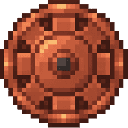

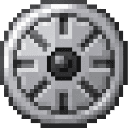



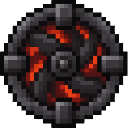
You can also find the disks by searching for their names in the Creative inventory.
How To Use
- Hold a disk and use the throw action to launch it.
- Aim toward terrain or mobs to send it bouncing and rolling through the area.
- After its outward trip, it turns back and homes toward you. Stay nearby to collect it when it returns.
Abilities And Mechanics
| Tier | Rolling damage to mobs |
|---|---|
| Copper | 2 |
| Iron | 3 |
| Diamond | 4 |
| Netherite | 5 |
The disk changes from a fast throw into a bouncing, rolling attack shortly after launch or when it hits something. Its rolling attack affects mobs close to the disk.
Progression And Strategy
Start with Copper, then upgrade each disk using the previous tier and its listed materials. For greater rolling damage and stronger bounces, work toward Netherite. Try throwing disks along walls or across open ground where they can ricochet through mobs before returning.
How to install
Download the mod and follow the step-by-step installation guide.
This mod is licensed under the CreativeMode Mods License.