

Description
Slice through foes, then watch your Starblade fly back to your hand.
Mod Wiki
Returning Starblade
Quickstart
Craft the Returning Starblade with a nether star, two diamonds, a blaze rod, and a trident:


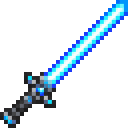
Hold the blade and use it to throw a Starblade toward your aim. Try it on a nearby mob or wall: it flies back after hitting a target or block, or after traveling for a short time. Throwing does not consume the blade, but using it again has a five-second cooldown.
For a color change, craft a Star Crystal and use it while holding the crystal in one hand and the blade in the other.
Overview
The Returning Starblade is both a melee sword and a throwable weapon. Its thrown blade deals 10 damage to a hit target, then turns back toward you. The blade itself stays in your inventory while its thrown form flies.
How To Use
- Melee: Attack with the blade as you would with a sword.
- Throw: Use the blade to launch it in the direction you are looking. It returns after hitting a mob or block, or after about 1.5 seconds.
- Recolor: Hold a Star Crystal in one hand and the Starblade in the other, then use the crystal. In Survival, this consumes one crystal; in Creative, it does not.
Crafting And Obtaining
Craft the Starblade from a nether star, two diamonds, a blaze rod, and a trident. Crafted blades come with Loyalty III.
Each Star Crystal recipe uses a nether star, two diamonds, and one dye of the matching color:
| Crystal | Recipe |
|---|---|
| White | |
| Orange | |
| Magenta | |
| Light Blue | |
| Yellow | |
| Lime | |
| Pink | |
| Gray | |
| Light Gray | |
| Cyan | |
| Purple | |
| Blue | |
| Brown | |
| Green | |
| Red | |
| Black |
Abilities And Mechanics
A Star Crystal changes the blade’s color, and that color remains on the blade after the crystal is used. The available colors are white, orange, magenta, light blue, yellow, lime, pink, gray, light gray, cyan, purple, blue, brown, green, red, and black.
How to install
This Java mod can be used on Windows and Mac PCs with the CreativeMode Launcher or any Minecraft launcher of your choice.

1. Download and install the new CreativeMode Launcher
2. Click to play on the top of the screen.
3. That's it — launches instantly. No complicated setup required.
Want to use on a different launcher? Download mod and manually install.
This mod is licensed under the CreativeMode Mods License.