



Description
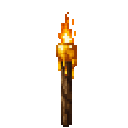
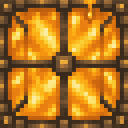
Decorate and light your builds with resin and TNT-themed torches and lanterns.
Mod Wiki
Resin Blastlight Lanterns
Quickstart
- In Creative mode, find all four lights in the Building Blocks tab.
- In Survival, craft a Resin Torch from honeycomb and a stick; the recipe makes four. Place it like a regular torch.
- Surround a Resin Torch or TNT Torch with iron nuggets to make its lantern version. Place lanterns on a surface or hang them beneath a block.
Overview
Resin Blastlight Lanterns adds four decorative light blocks: Resin Torch, Resin Lantern, TNT Torch, and TNT Lantern. The TNT-themed lights are used for lighting and decoration.
What It Adds
| Light | Light level |
|---|---|
| Resin Torch | 14 |
| Resin Lantern | 15 |
| TNT Torch | 15 |
| TNT Lantern | 15 |
Crafting And Obtaining
The recipes are also available in Creative mode through the Building Blocks tab.
- Resin Torch — honeycomb and a stick; yields four.
- Resin Lantern — eight iron nuggets around a Resin Torch.
- TNT Torch — a TNT and a regular torch in any crafting arrangement; yields four.
- TNT Lantern — eight iron nuggets around a TNT Torch.
How To Use
Place the torches and lanterns as you would their ordinary Minecraft counterparts. Use torches for wall or floor lighting, and place lanterns on blocks or hang them beneath blocks.
Abilities And Mechanics
Both torch variants produce flame particles. Resin and TNT lanterns emit light level 15; the Resin Torch emits 14, while the TNT Torch emits 15.
How to install
This Java mod can be used on Windows and Mac PCs with the CreativeMode Launcher or any Minecraft launcher of your choice.

1. Download and install the new CreativeMode Launcher

2. Click to play on the top of the screen.
3. That's it — launches instantly. No complicated setup required.
Want to use on a different launcher? Download mod and manually install.
This mod is licensed under the CreativeMode Mods License.