

Description
Request Boards adds freestanding 2x2 quest panels that naturally spawn across Overworld biomes with distinct biome-specific looks and act as persistent, localized retrieval quest hubs; a Creative-only Request Board Spawner is also provided. Right- or left-click a board to open a redesigned pop-up GUI with nine quest icons and quantities, a widened detail panel, submission slots that only accept the selected quest item, and your inventory along the bottom — click a quest to select it (one active quest per open session), place the required item(s) into the submission slots and press Complete to consume them and receive XP plus a randomized tiered reward; each board keeps its nine unique tasks and inventory across world loads and replaces completed tasks with new ones. Boards now emit a tall, biome-colored magical beam with extra glow and particles visible from up to 150 blocks so they’re easy to spot, and they can spawn near village centers (placement avoids nearby duplicates) as well as in ultra-rare natural locations that are slightly more common than before.
Mod Wiki
Request Boards
Quickstart
- Find a board in the world — look for a tall glowing magical beam rising from the ground. Boards spawn naturally near village centers and in rare locations across Overworld biomes. The beam is visible up to ~150 blocks away (subject to your render distance).
- Open it — right-click or left-click the board to open the quest GUI.
- Pick a quest — click any of the nine quest icons on the left panel to select it.
- Submit items — place the required items into the submission slots on the right, then press Complete.
- Collect your reward — you receive XP and a randomized tiered reward item. The completed quest is replaced with a new one automatically.
To place a board anywhere yourself, craft the Request Board Spawner (Creative-only), then right-click a surface to place a board facing you.
Overview
Request Boards adds freestanding 2×2 quest panels to the Overworld. Each board holds nine persistent retrieval quests — collect items, hand them in, earn XP and loot. Boards match the biome they spawn in, each with a distinct visual style and colored magical beacon beam. Tasks and inventory are saved across world loads, and completed quests are automatically refreshed with new ones, making each board a recurring source of rewards.
What It Adds
| Content | Description |
|---|---|
| Request Board | A 2×2 freestanding quest panel. Spawns naturally in Overworld biomes and near village centers. Five biome styles: Plains, Forest, Desert, Snowy, Jungle. |
| Request Board Spawner | Creative-only item. Right-click any surface to place a biome-appropriate Request Board. Stacks to 16. Found in the Functional Blocks creative tab. |
Biome Styles & Beam Colors
| Style | Beam Color | Biomes |
|---|---|---|
| Plains | Mint green | Default / plains |
| Forest | Bright green | Forest, grove, wooded |
| Desert | Golden yellow | Desert, badlands, savanna |
| Snowy | Ice blue | Snowy, frozen, ice, taiga |
| Jungle | Vivid green | Jungle, bamboo |
How To Use
Finding Boards
Boards emit a tall biome-colored magical beam with glowing particles that rises ~96 blocks and is renderable up to 150 blocks away (depending on your render distance setting). Boards spawn:
- Near village centers — one board per village, placed close to the center.
- Rare random Overworld locations — one per large region, slightly more common than ultra-rare.
Boards avoid spawning near duplicates, so each one is uniquely placed.
Using the Quest GUI
Open a board by right-clicking or left-clicking it. The GUI has three main areas:
| Area | Description |
|---|---|
| Quests panel (left) | Nine quest icons, each showing the required item and quantity. Click one to select it. |
| Details panel (center) | Shows the selected quest number, item needed, and how many you have placed vs. required. |
| Submissions panel (right) | Slots that only accept the currently selected quest item. Fill them with the required amount. |
| Inventory (bottom) | Your player inventory for easy access while submitting items. |
Only one quest can be active per open session. After selecting a quest and placing the correct items in the submission slots, press Complete to hand them in.
Completing Quests
When you press Complete with all required items placed:
- The items are consumed.
- You receive 75–150 XP.
- A randomized tiered reward is granted (see Rewards below).
- A confirmation message appears on screen.
- The completed quest slot is replaced with a brand-new task.
The board's remaining eight quests and any items left in submission slots persist across world reloads.
Crafting And Obtaining
All five Request Board variants are craftable. Each uses a biome-appropriate sign type plus Paper. Recipes are unlocked automatically when you join a world.
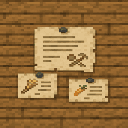
Plains Request Board


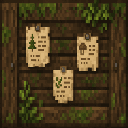
Forest Request Board

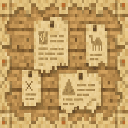
Desert Request Board

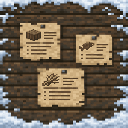
Snowy Request Board

Jungle Request Board

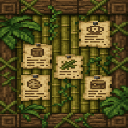
Request Board Spawner (Creative use — places any style board based on the biome at placement)


The Request Board Spawner recipe uses Birch Signs and Paper.
Abilities And Mechanics
Magical Beacon Beam
Every placed board emits a tall cross-shaped beam of biome-colored light with a bright white core, surrounded by glowing and electric-spark particles. The beam rises ~96 blocks above the board and is visible up to 150 blocks away depending on render distance — making boards easy to spot from a distance.
Persistent State
Each board saves its nine unique quests and any items currently in its submission slots to the world. Quests are not shared between boards — each one has its own independent set of tasks.
Quest Item Pool
Tasks are drawn randomly from a large pool including:
- Farm goods: Wheat, Carrot, Potato, Bread, Egg, Apple
- Mob drops: Feather, Leather, String, Bone, Gunpowder, Spider Eye
- Resources: Coal, Copper Ingot, Iron Ingot, Gold Ingot, Redstone, Lapis Lazuli
- Wood & materials: Oak/Spruce/Birch Logs, Sand, Clay, Glass, Paper, Book, Ink Sac
- Other: Cod, Salmon, Honeycomb, and occasionally a Request Board Spawner
Quantities are randomized within a range per item type. No two active quests on the same board will request the same item.
Progression And Strategy
Reward Tiers
Rewards are drawn from five tiers with weighted probability:
| Tier | Chance | Example Rewards |
|---|---|---|
| Silly | ~27.5% | Cookies, Cake, Pumpkin Pie, Name Tag |
| Common | ~37.5% | Emeralds, Iron Ingots, Gold Ingots, XP Bottles, Torches |
| Useful | ~25% | Diamonds (×2), Ender Pearls, Saddle, Golden Apple |
| Rare | ~7.5% | Diamonds (×5), Netherite Upgrade Template, Totem of Undying, Enchanted Golden Apple |
| Legendary | ~2.5% | Netherite Ingot, Elytra, Heart of the Sea, Nether Star, Dragon Head |
Tips
- Village boards are the easiest to find early game — explore villages and look for the colored beam near the center.
- Farm common quest items (Wheat, Carrots, Logs) to quickly clear lower-difficulty tasks and fish for Rare or Legendary rewards.
- Each board refreshes completed quests automatically, so revisiting boards pays off over time.
- The Request Board Spawner lets Creative players place boards anywhere, useful for testing or custom map setups. It auto-detects biome style at placement.
- Submission slots only accept the item for your currently selected quest — make sure you've clicked the right quest icon before placing items.
How to install
This Java mod can be used on Windows and Mac PCs with the CreativeMode Launcher or any Minecraft launcher of your choice.

1. Download and install the new CreativeMode Launcher

2. Click to play on the top of the screen.
3. That's it — launches instantly. No complicated setup required.
Want to use on a different launcher? Download mod and manually install.
This mod is licensed under the CreativeMode Mods License.