Description
Craft the Portal Loop Arsenal item using this recipe. In Creative mode, find it in the Combat tab.


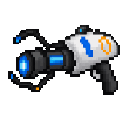
Hold the item, aim at a block face with empty space just beyond it, and use it to place a portal. Your first placement is Blue; the next is Amber. Place both, then walk into either surface to travel to the other—including across dimensions.
Sneak-use the item to switch the selected color before placing. A successful placement automatically switches the selection for next time.
The item places Blue and Amber portal surfaces that link the latest active endpoint of each color. Portals are placed in the empty block space just beyond the face you’re aiming at, up to 64 blocks away.
The recipe unlocks when you enter a world. The item stacks to one.
There is one active Blue endpoint and one active Amber endpoint. Placing another portal of a color moves that color’s active endpoint; older surfaces of that color remain but no longer teleport entities. Teleporting has a brief cooldown of about one second per entity.
This Java mod can be used on Windows and Mac PCs with the CreativeMode Launcher or any Minecraft launcher of your choice.

1. Download and install the new CreativeMode Launcher
2. Click to play on the top of the screen.
3. That's it — launches instantly. No complicated setup required.
Want to use on a different launcher? Download mod and manually install.
This mod is licensed under the CreativeMode Mods License.

