

Description
can you make a morph mod were i can morph into any mob and any block using a morphing bracelet
Mod Wiki
Omniform Bracelet
Quickstart
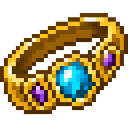
Craft the Morphing Bracelet, put it in your hand, and use it to open the transformation menu. Choose Mob form or Block disguise, select a form, and press Transform. Choose Return to normal whenever you want your usual appearance back.
In Block disguise mode, try pressing Sneak + Jump together to place your selected block in an empty space ahead of you. Press the combo again to move freely.
Overview
The bracelet lets you change your player’s appearance into one of 35 creature forms or 15 block disguises. Creature forms change how your player looks; they do not spawn a separate mob.
What It Adds
Creature forms: Allay, Armadillo, Axolotl, Bat, Bee, Camel, Cat, Chicken, Cow, Creeper, Dolphin, Enderman, Endermite, Fox, Frog, Goat, Iron Golem, Mooshroom, Ocelot, Panda, Parrot, Pig, Piglin, Polar Bear, Rabbit, Sheep, Skeleton, Sniffer, Spider, Turtle, Villager, Warden, Witch, Wolf, and Zombie.
Block disguises: Stone, Dirt, Cobblestone, Sand, Oak Planks, Bedrock, Obsidian, Iron Block, Gold Block, Diamond Block, Emerald Block, Bricks, Snow, Netherrack, and Quartz.
How To Use
- Use the bracelet to open its menu.
- Choose a mode: Return to normal, Mob form, or Block disguise.
- Select a creature or block form, then choose Transform.
In Block disguise mode, press Sneak + Jump together to place the selected block in an empty space ahead at about your level. This also locks your movement. Press Sneak + Jump again to unlock movement. The placed block remains in the world.
Crafting And Obtaining
Craft the bracelet at a crafting table:


Abilities And Mechanics
Block disguises make your player appear as the selected block and shrink the player model. The Sneak + Jump interaction places a real block; it is separate from your block-form appearance.
Progression And Strategy
There’s no transformation progression to unlock: use the bracelet menu to try any listed form. In Block disguise mode, check that the space ahead is empty before using Sneak + Jump, and remember to use the combo again when you want to move.
How to install
Download the mod and follow the step-by-step installation guide.
This mod is licensed under the CreativeMode Mods License.