

Description
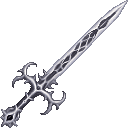
Wield Oblivion’s Crown to trap nearby foes in blue webs and dash through battle.
Mod Wiki
Oblivions Crown
Quickstart
Craft Oblivion’s Crown, then hold it in either hand. Press your swap-hands/offhand key (F by default) to toggle Hollow Coronation on or off. With the Crown held, sneak and press the same key to dash in the direction you’re looking.
Try Hollow Coronation near monsters to slow them and surround them with temporary blue webs. Use the dash to cross a fight and weaken foes in your path.
Overview
Oblivion’s Crown is a single-stack sword with two abilities for controlling and moving through combat. Keep it in either hand to use its powers.
What It Adds
- Oblivion’s Crown: A craftable sword and the focus for both abilities.
- Hollow Coronation Web: A blue web created around nearby foes by Hollow Coronation. It slows living entities that pass through it and disappears after a short time.
How To Use
Press the swap-hands/offhand key while holding the Crown to turn Hollow Coronation on or off. An on-screen message confirms its state. While active, it pulses about once per second; keep the Crown in either hand to maintain the effect.
Sneak and press the swap-hands/offhand key while holding the Crown to dash. The dash travels up to about five blocks in your look direction, stopping short if blocked. It has a brief cooldown.
Crafting And Obtaining
Craft the Crown with a crafting table:


Abilities And Mechanics
| Ability | Effect |
|---|---|
| Hollow Coronation | Slows monsters and other players within 10 blocks, and places temporary webs in open spaces at their feet and above them. |
| Oblivion | Dashes forward and weakens foes close to the dash’s path for a short time. |
The webs can slow any living entity that enters them. Crown abilities target monsters and players; they do not target other living creatures such as animals.
How to install
This Java mod can be used on Windows and Mac PCs with the CreativeMode Launcher or any Minecraft launcher of your choice.

1. Download and install the new CreativeMode Launcher
2. Click to play on the top of the screen.
3. That's it — launches instantly. No complicated setup required.
Want to use on a different launcher? Download mod and manually install.
This mod is licensed under the CreativeMode Mods License.