

Description
Ignite Nuke TNT and unleash colossal explosions that reshape the world.
Mod Wiki
Nuke Tnt
Quickstart
- Craft one Nuke Tnt with eight TNT and one Nether Star:


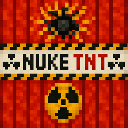
- Place the Nuke Tnt block where you want the explosion.
- Ignite it using a standard TNT ignition method, such as Flint and Steel, a Fire Charge, or a redstone signal.
- Move well away from the blast area. After a short fuse of roughly 2–3 seconds, it detonates with an extremely large explosion.
In Creative mode, you can also find Nuke Tnt in the Redstone item group or obtain it with:
/give @s nuke-tnt-j6qjvypx:nuke_tnt_j6qjvypx
Overview
Nuke Tnt is a placeable explosive block that behaves like TNT but produces a colossal explosion. Use it to clear large areas, reshape terrain, or create dramatic demonstrations in a world where extensive block and entity damage is acceptable.
What It Adds
- Nuke Tnt, a placeable TNT-like block
- A custom primed TNT entity with the familiar primed-TNT appearance
- A powerful explosion with a strength of 32
- Crafting using TNT and a Nether Star
- Support for standard TNT ignition methods
How To Use
Place It
Hold Nuke Tnt and place it like a normal block. It can be stacked and carried in stacks of up to 64.
Ignite It
Nuke Tnt responds to normal TNT ignition methods, including:
- Flint and Steel
- Fire Charges
- Redstone signals and redstone devices
- Explosions that prime nearby TNT-like blocks
When ignited, the placed block becomes a primed explosive and begins its fuse. Primed Nuke Tnt cannot be treated as an ordinary block while it is counting down.
Wait For The Detonation
The fuse lasts roughly 2–3 seconds. Use that time to retreat behind substantial cover or leave the area entirely. The resulting explosion can destroy a very large volume of terrain and damage nearby entities.
Crafting And Obtaining
The recipe uses eight TNT surrounding one Nether Star. Crafting produces one Nuke Tnt:
In Creative mode, Nuke Tnt is available in the Redstone item group. Its item ID for commands is:
nuke-tnt-j6qjvypx:nuke_tnt_j6qjvypx
Abilities And Mechanics
- Explosion strength: 32
- Fuse: Approximately 40–59 game ticks after ignition
- Block damage: The explosion can destroy and reshape terrain over a wide area.
- Entity damage: Living entities caught near the blast can take severe damage.
- Priming behavior: Nuke Tnt uses a primed explosive entity while its fuse is active.
- Chain reactions: An explosion can prime nearby unignited Nuke Tnt, causing additional detonations.
Progression And Strategy
Nuke Tnt is an endgame-style explosive because every unit requires a Nether Star in addition to eight TNT. Reserve it for large-scale excavation, clearing dangerous areas, or controlled destruction.
Before igniting one:
- Back up or secure anything you want to keep.
- Mark the blast area and remove valuable blocks nearby.
- Use long sight lines, cover, or a distant redstone trigger.
- Test the explosion in a disposable area before using it near a base or important build.
- For multiple blasts, space the charges apart and ignite them from a safe distance to avoid being caught in overlapping explosions.
How to install
This Java mod can be used on Windows and Mac PCs with the CreativeMode Launcher or any Minecraft launcher of your choice.

1. Download and install the new CreativeMode Launcher

2. Click to play on the top of the screen.

3. That's it — launches instantly. No complicated setup required.
Want to use on a different launcher? Download mod and manually install.
Players also liked
Village Killer


Village Killer v5 adds a powerful single‑use Village Killer nuke: right‑click to throw it like a snowball and it detonates on impact, carving a massive jagged crater and unleashing a wide shockwave that heavily damages mobs and can break some obsidian when blasts overlap. The upd…
Redstone Smart Phone


The Redstone Smart Phone is a portable in‑game smartphone you open with right‑click that provides apps like TikTok, AI Assistant, Calls, Messages, Wallet, Taxi, and Online Trades; it emits light while held and supports redstone toggles via sneak + right‑click. The Wallet app has…




Flying Thunder Drop Biplane


The Thunder Drop Biplane is a rideable aircraft that you can mount by right-clicking the placed structure, which automatically switches your view to third-person and puts you in the cockpit. Use W/A/S/D to steer, Space to ascend, and Shift to descend; press Ctrl to safely exit an…


This mod is licensed under the CreativeMode Mods License.