


Description
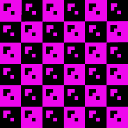
Place a block that brings the iconic missing-texture look into your world.
Mod Wiki
Missing Texture Block
Quickstart
- Open the Creative inventory and search for Missing Texture Block, or craft one at a crafting table.
- Select it and place it like any other block to bring the iconic missing-texture look into your world.
- Break the block and collect the dropped Missing Texture Block so you can place it again elsewhere.
The crafting recipe uses eight purple wool and one black concrete:
Overview
Missing Texture Block adds a decorative full-sized block with the recognizable missing-texture appearance. It occupies a normal block space, has a solid collision area, and can be placed in builds, displays, maps, or themed areas.
What It Adds
- Missing Texture Block — a placeable construction block with the iconic missing-texture look.
- A crafting recipe for producing the block.
- A self-dropping block that can be picked up after breaking.
How To Use
Placing
Hold the Missing Texture Block and use the normal place-block control on a suitable block face. It fills a full block space and can be used as part of ordinary structures.
Breaking
Break it using the normal block-breaking control. The block drops one Missing Texture Block at its position, allowing you to collect and reuse it.
Crafting And Obtaining
You can obtain the block in either of these ways:
- Find Missing Texture Block in the Creative inventory under construction blocks.
- Craft it at a crafting table using .
The recipe requires:
- 8 purple wool
- 1 black concrete
- 1 crafting table
The purple wool fills every slot around the outside of the crafting grid, with black concrete in the center.
Abilities And Mechanics
- It is a full block with solid collision.
- Entities can land on its top surface.
- It has no stated active ability or special interaction; its main purpose is visual decoration.
- Breaking it returns one copy of the block.
Progression And Strategy
Use Creative mode to start decorating immediately, or gather purple wool and black concrete to craft your own supply. Because the block drops itself when broken, you can freely rearrange displays, build repeating patterns, and reuse blocks in different locations.
How to install
Download the mod and follow the step-by-step installation guide.
This mod is licensed under the CreativeMode Mods License.