

Description
Craft and drive a sleek M5-inspired sedan, shifting through four gears as you explore Minecraft.
Mod Wiki
Midnight M5
Quickstart
Craft a Midnight M5 Sedan:


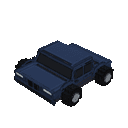
Use the sedan item on the top face of a block with enough open space above it to place the car. Right-click the parked car to get in. Use W to accelerate, S to brake or reverse, and A/D to steer. Press Sprint to get out.
Overview
Midnight M5 is a placeable, drivable sedan. While driving, the view switches to third-person behind the car, then returns to your previous perspective when you get out. A HUD shows the current gear and speed in km/h.
How To Use
| Action | Control |
|---|---|
| Enter a parked car | Right-click it |
| Accelerate or brake while reversing | W |
| Brake while moving forward, or reverse | S |
| Steer | A / D |
| Exit | Sprint |
Only one player can ride in the car at a time. Steering works while moving, and the steering direction reverses when backing up.
Crafting And Obtaining
Craft the sedan item using the recipe in Quickstart. Placing it consumes one item in Survival; Creative players keep theirs. A car destroyed by damage drops a sedan item.
Abilities And Mechanics
The car has an automatic gearbox: R for reverse, N at a stop, and forward gears 1–4. There are no manual shifting controls. Releasing the acceleration and brake lets the car coast and gradually slow down.
How to install
This Java mod can be used on Windows and Mac PCs with the CreativeMode Launcher or any Minecraft launcher of your choice.

1. Download and install the new CreativeMode Launcher

2. Click to play on the top of the screen.

3. That's it — launches instantly. No complicated setup required.
Want to use on a different launcher? Download mod and manually install.
This mod is licensed under the CreativeMode Mods License.