

Description
Ride the Meadow Mower, trim grass and flowers, and collect your harvest.
Mod Wiki
Lawnmower
Quickstart
Craft the Meadow Mower, place it in a clear area, then right-click any part of the placed mower to turn it into a rideable vehicle.


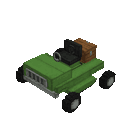
While riding, use WASD to drive and Space to jump. Move over grass and flowers to mow them and collect their drops. Sprint to dismount.
Overview
The Meadow Mower is a rideable grass-and-flower harvester. It collects plant drops in its own storage as you drive, so you can clear an area without picking up each drop by hand.
How To Use
- Place the mower item. Its other parts appear automatically where the surrounding blocks can be replaced, so give it room.
- Right-click any part of the placed mower to board. The placed structure is removed as the rideable mower appears.
- Drive over plants to mow them. Open the mower’s inventory to retrieve your harvest.
- Press Sprint to get off. Right-click the vehicle to ride it again.
While riding, the view switches to third person. A display at the top of the screen shows speed, heading, and altitude. Open your inventory while riding to access the mower’s storage; you can also sneak and right-click the mower.
Crafting And Obtaining
The Meadow Mower recipe uses iron ingots, iron bars, shears, a minecart, and a saddle. See the recipe above for the crafting layout.
Abilities And Mechanics
- The mower harvests flowers, short and tall grass, ferns, dead bushes, sweet berry bushes, azaleas, flowering azaleas, and leaf litter as it moves.
- Harvested plants give their normal drops, which go into the mower’s 12 storage slots.
- If the storage cannot fit a plant’s drops, that plant is left in place.
- Press Space to jump. The mower can also hop automatically when driving into a one-block obstacle if there is room above it.
Progression And Strategy
Start in a flower- or grass-covered area and drive in passes to gather plants efficiently. Empty the mower’s storage when it fills up; making space lets you keep harvesting.
How to install
This Java mod can be used on Windows and Mac PCs with the CreativeMode Launcher or any Minecraft launcher of your choice.

1. Download and install the new CreativeMode Launcher

2. Click to play on the top of the screen.
3. That's it — launches instantly. No complicated setup required.
Want to use on a different launcher? Download mod and manually install.
Players also liked

Infinity Master Gauntlet


a insane gauntlet be carefull though not all abiltys are helpfull
This mod is licensed under the CreativeMode Mods License.