

Description
Generates fully enclosed mazes with entrance and exit signs aligned to the openings
Mod Wiki
Maze Generator
Quickstart
- Craft the Maze Generator item using the recipe below.
- Hold the item and right-click on top of any block where you want your maze to appear.
- A configuration screen opens — set your desired size, difficulty, and block type.
- Confirm generation, and watch the maze build itself block by block above the clicked location.
- Look for the ENTRANCE sign to start, and find your way to the EXIT sign to win.
Overview
Maze Generator lets you spawn fully enclosed, solvable mazes anywhere in the world with a single item. Every generated maze is enclosed on all sides, with clearly marked entrance and exit points so you always know where to go in and how you're meant to get out. It's a quick way to create a custom challenge, minigame, or decorative structure without any manual building.
What It Adds
- Maze Generator item – a tool used to trigger maze construction in the world.
- A configuration screen for customizing maze size, difficulty, chaos level, mob spawners, and building material.
- Automatically placed entrance and exit signs, aligned to face the correct opening so players can immediately tell which way to go.
How To Use
- Right-click any block with the Maze Generator item to open the maze configuration screen. The maze will be centered near the spot you clicked (just above it).
- In the configuration screen you can set:
- Center position (X, Y, Z) – where the maze will be built, pre-filled based on where you clicked.
- Width (X and Z) – the footprint of the maze, from 3 up to 50 blocks in each direction.
- Height – how tall the maze corridors are, from 2 up to 20 blocks.
- Difficulty – controls how twisty and complex the maze pathing is.
- Chaotic factor – adds extra randomness to the maze layout.
- Mob Spawners toggle – optionally populate the maze with mob spawners for added challenge.
- Block Type – the material used to build the maze walls and floor (enter a block name).
- After confirming, the maze is generated gradually over several game ticks so large mazes won't freeze the game.
- You must be standing within about 100 blocks of the target location to generate a maze there — stand closer if you get a "too far away" message.
- Once built, walk in through the ENTRANCE sign (marked "Good Luck!") and try to find your way out through the EXIT sign (marked "You Made It!").
Crafting And Obtaining
The Maze Generator item is crafted using redstone, a compass, oak signs, and iron ingots — fitting materials for a tool about navigation and construction.


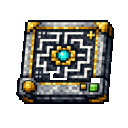
The crafted item only stacks to one at a time, since it's a reusable tool rather than a consumable.
Abilities And Mechanics
- The item has a persistent enchantment-like glint, marking it as a special tool.
- Right-clicking any block face with it opens the maze builder screen — it does not consume the item or place blocks directly.
- Mazes are always fully enclosed, meaning there's no way to leave except through the marked entrance and exit.
- Signs are automatically rotated and placed to align exactly with the maze's entrance and exit corridors, so they're always readable from outside.
- Maze construction is queued and placed over time rather than instantly, so very large mazes may take a moment to fully appear.
Progression And Strategy
- Start with small, low-difficulty mazes to get a feel for how entrances and exits are marked before building larger ones.
- Increase width, height, and difficulty for a bigger challenge, or enable the chaotic setting for more unpredictable layouts.
- Turn on mob spawners for a more dangerous maze-running experience, ideal for minigames or survival challenges.
- Experiment with different block types to create mazes with different visual themes — from stone dungeons to wooden hedge-like layouts.
- Because mazes are enclosed, they make good arenas for timed challenges, hide-and-seek, or PvP courses with friends.
How to install
This Java mod can be used on Windows and Mac PCs with the CreativeMode Launcher or any Minecraft launcher of your choice.

1. Download and install the new CreativeMode Launcher

2. Click to play on the top of the screen.
3. That's it — launches instantly. No complicated setup required.
Want to use on a different launcher? Download mod and manually install.
Players also liked

Glacial Dash Gem


The Glacial Dash Gem is a mystical item that grants two powerful ice-based abilities with a 3-second cooldown between uses. Right-click to dash forward at high speed while gaining Speed III and Jump Boost II effects for 2 seconds, perfect for quick escapes or traversing terrain.…
Creative Catalyst


Now for 1.20.1 to! This mod adds the Creative Catalyst, an item that lets you toggle only your own gamemode between Survival and Creative: right-click while in Survival to consume it and switch to Creative (5 second cooldown, message: Reality bends. You ascend.), and right-click…
Omega Singularity


The Omega Singularity is a catastrophic one-time-use weapon that unleashes reality-collapsing destruction upon activation. Right-click and hold for 5 seconds to charge the item, which will then spawn a singularity entity that progresses through five devastating phases over 33 sec…
Wasteland Power Frame
 anon
create a minecraft item that has the following description: 'fallout power armor set that adds strength, speed, jump boost'
Black Flash


The Blessing of Sparks is a passive hotbar item that grants you the ability to perform devastating Black Flash attacks during melee combat. Simply keep the item in any of your hotbar slots (0-8) and engage enemies in melee combat - each hit has a chance to trigger either a Regula…
This mod is licensed under the CreativeMode Mods License.