

Description
Build a multiplayer shop with visible item displays, earn currency, and trade items safely with other players.
Mod Wiki
The Market
Quickstart
New accounts start with 250 coins. The Market Ledger and, if you have not registered a shop, a Market Shop Stand are supplied automatically.
To craft a stand at a crafting table:


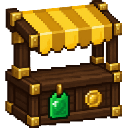
Place the stand somewhere with a clear 9×9 area and open space above it. Then sneak-use the stand to build your shop; building it replaces blocks in its footprint. The shop has ten wall displays. Sneak-use a display to stock it with an item from your inventory and set its price. Customers can use a stocked display to buy.
To open the market menu, sneak-use the Market Ledger or enter /lockbox:market. Try the Gallery for goods to buy, or Sell to list an item for other players.
Overview
The Market adds player shops, item listings, direct trades, and a shared coin balance. Coins are used for market purchases; earn them by selling items or receiving coins from other players.
What It Adds
| Content | Use |
|---|---|
| Market Ledger | Opens the market menu when sneak-used. |
| Market Shop Stand | Starts your physical shop when placed and sneak-used. |
| Market Item Holders | Ten displays built into each shop; they show the listed item, stock amount, and price. |
| Gallery | Ten randomly selected goods with unlimited stock, sold by the market. |
| Player listings and trades | Sell items through the menu or exchange items directly with another player. |
How To Use
Your shop
- Place your Market Shop Stand, then sneak-use it to build the shop. Only its owner can activate or manage it.
- Sneak-use a wall display to add or change its item and price, or remove its stock. Shop stock is taken from your inventory.
- Other players use a stocked display to choose an amount and buy. The item goes into their inventory, and the coins go to you.
- Displays show the item and price as a preview. Buy through the display interaction rather than trying to take the displayed item.
Market menu
Use the Ledger while sneaking, or open the menu with /lockbox:market.
- Buy: Browse other players’ listings by category, choose an amount, review the cost, and confirm. Your coins are credited to the seller.
- Sell: Choose an eligible inventory stack, set its amount and price per item, and create a listing. Listed items are held for sale; use My Listings to return an unsold listing to your inventory.
- Gallery: Buy from the market’s selection of ten goods. Gallery stock is unlimited.
- Gift Coins: Send coins to another online player.
- Leaderboard: View player balances.
Direct trades
Choose Trade, select an online player, and invite them. Each player can add items to their offer and review both offers. When both players are ready, a five-second countdown begins. Changing an offer or withdrawing readiness stops the countdown; either player can cancel the trade.
Crafting And Obtaining
The Market Shop Stand recipe is shown in Quickstart. The Market Ledger and an initial stand are supplied automatically when your account is set up; the stand is supplied if you have not registered a shop. The ten Market Item Holders are built as part of your shop.
Abilities And Mechanics
- Listings and trade offers use escrow: items are set aside while listed or offered, rather than exchanged as dropped items.
- Purchases are limited by available stock, your balance, and inventory space.
- Market listings and trade offers accept ordinary stackable, unnamed items. Unique or named gear stays in your inventory.
- Your balance is visible in the market menu. A sale or shop purchase credits the seller’s account automatically.
Progression And Strategy
Use your starting coins to try the Gallery, then sell goods or stock your shop to earn more. Set clear per-item prices and keep enough room in your inventory for purchases. For shop building, choose a site where replacing blocks in the 9×9 footprint will not damage anything you want to keep.
How to install
Download the mod and follow the step-by-step installation guide.
Players also liked




Black Knife


*New content update* Scroll past the description for details! The Roaring Knight's signature weapon, the Black Knife. Gather Black Shards, craft it in your own survival world, and unleash unmatched power on your foes and show your friends who's the boss. The Black knife has 2 a…

Soul Jar Vacuum (Capture Mobs)

Catch mobs in jars boi. Seriously. Release them when ya want, or store them on shelves like a creepy mob hunter. Or... make soul stews or even soul arrows that release the captured mob when your designated soul arrow makes impact at a target. Yours truly, Ballblaster. The soul st…


This mod is licensed under the CreativeMode Mods License.