

Description
Fly an invincible Ironclad Bombwing and rain TNT on the world below.
Mod Wiki
Ironclad Bombwing
Quickstart
Craft the Bombwing, then place it in an open area. Right-click any part of the placed Bombwing to climb aboard and launch.


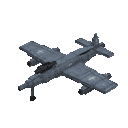
Once flying, steer with your mouse, use W to gain speed and S to slow down, and press Space to drop TNT. Press Ctrl to exit.
Overview
Ironclad Bombwing lets you fly a large, rideable aircraft and drop primed TNT. The aircraft is invincible to ordinary damage, and its cockpit displays your speed, heading, altitude, and controls.
What It Adds
- The Ironclad Bombwing item, which places the aircraft as a multi-block structure.
- An aircraft you can mount, steer, and use to drop TNT.
How To Use
- Place the Bombwing where there is room for its large structure.
- Right-click any of its placed parts to turn it into a rideable aircraft and mount it.
- Steer by looking in the direction you want to fly, including up or down.
- Press Space to release a bomb. Press Ctrl to dismount; the aircraft stays in the world and can be mounted again.
Crafting And Obtaining
Craft the Ironclad Bombwing from iron ingots, an elytra, TNT, an iron block, and a firework rocket using the recipe above.
Abilities And Mechanics
- Flight: Mouse-look steers the aircraft. W increases its persistent cruise speed, while S reduces it; it cannot slow below its minimum cruise speed.
- Bombing: Space drops primed TNT in the direction you are facing, with a slight downward push. Bombs have a one-second cooldown and do not consume TNT from your inventory.
- Riding: The aircraft carries one rider. Your character becomes invisible while aboard, and visibility returns when you dismount.
- Durability: Ordinary damage does not destroy the aircraft.
Progression And Strategy
Build up speed with W, then adjust your aim with the mouse before bombing. Use the speed, heading, and altitude display to help line up your approach. Start in a clear area so the placed structure has room to form.
How to install
This Java mod can be used on Windows and Mac PCs with the CreativeMode Launcher or any Minecraft launcher of your choice.

1. Download and install the new CreativeMode Launcher
2. Click to play on the top of the screen.
3. That's it — launches instantly. No complicated setup required.
Want to use on a different launcher? Download mod and manually install.
This mod is licensed under the CreativeMode Mods License.