

Description
Live as a tree! With this mod active when you first spawn you will be a wandering spirit. Equipped with a Heartwood Orb, you are explore the world, but you are unable to interact with anything until you chose a tree to use the Heartwood Orb on, binding you to that tree and any direct log connections made to it.
Mod Wiki
Heartwood Bound
Quickstart
-
On your first spawn, find the Heartwood Orb in your inventory. It is automatically given to you and does not stack.
-
Hold the orb and use it on any tree log, wood, stem, or hyphae block.
-
The orb is consumed, and that block becomes your Heart Tree.
-
Stay within three blocks of your Heart Tree or another recognized heartwood anchor. While tethered, you can break blocks, place blocks, use items, and interact with entities only within this range.
-
Watch the action bar for your tether distance. If you move too far away, the Heart Tree pulls you back.
-
To temporarily escape the tether, craft The Spirit Shears, return near your Heart Tree, and use them.
-
When traveling through any portal it is suggested that you first, use The Spirit Shears, travel through the portal, place logs to extend your reach beyond the portal, then travel back through the portal to avoid any issues.
Overview
Heartwood Bound ties each player to a personal network of trees and heartwood anchors. Your first tree is the center of your world, and connected or deliberately placed tree growth can extend the area where you are allowed to live and work.
The tether applies separately to each player, so every player can have their own Heart Tree and heartwood network.
What It Adds
- Heartwood Orb — Binds you to your first tree.
- Heart Tree tether — Restricts movement and interaction to a three-block radius around your heartwood.
- Heartwood descendants — Logs and tree starters can become additional anchors, extending your reachable area.
- The Spirit Shears — Temporarily sever the tether for one minute at the cost of severe movement and combat penalties.
- Dimension anchors — Each newly reached dimension receives its own heartwood arrival point.
How To Use
Binding to a Heart Tree
Before binding, the world is dormant to you:
- You cannot break blocks.
- You cannot place or use normal items.
- You cannot interact with entities.
- You can still use the Heartwood Orb on a valid tree-wood block.
Select the orb and use it directly on a tree log, wood block, stem, or hyphae block. The orb is consumed, and the targeted block becomes your Heart Tree.
Staying Within the Tether
Your active heartwood anchors provide a three-block radius of interaction and movement. The nearest anchor is used when several anchors overlap.
While tethered, the action bar displays:
- Your current distance from the nearest heartwood anchor.
- The three-block tether limit.
- The anchor's coordinates.
If you cross the limit, the tether pulls you back toward the nearest anchor and shows a TETHER REACHED warning.
Expanding Your Heartwood
You can extend your playable area by creating a connected chain of heartwood:
- Place a tree log or equivalent wood block within three blocks of an existing anchor.
- Place a sapling, mangrove propagule, or fungus within your current tether range.
- Keep tree logs connected to known heartwood anchors. Adjacent descendant logs are recognized as additional anchors after a short delay.
Each recognized anchor gives you another three-block area in which you can move and interact. Build a connected trail of logs or grow a chain of trees to gradually expand your territory.
Traveling Between Dimensions
When you enter a dimension that already has one of your heartwood anchors, your tether reconnects to that dimension's saved anchors.
The first time you enter a new dimension while bound:
- The block directly beneath your arrival point becomes a heartwood anchor.
- An oak log is placed there when possible.
- You can explore around that arrival anchor within the normal three-block range.
- You can expand the new area by building connected heartwood as usual.
Crafting And Obtaining
Heartwood Orb
The Heartwood Orb is granted automatically the first time you spawn. It is not crafted and is consumed when it binds you to a tree.
In Creative mode, it can also be selected from the item inventory.
The Spirit Shears
Craft The Spirit Shears at a crafting table using a pair of shears, two crying obsidian, two experience bottles and four amethyst shards:


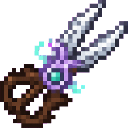
In Creative mode, the item is also available from the item inventory.
Abilities And Mechanics
The Spirit Shears
Use The Spirit Shears while standing within three blocks of one of your heartwood anchors to sever your tether.
For the next 60 seconds:
- You can move freely away from your heartwood.
- You can break, place, use, and interact outside the normal tether range.
- You receive Slowness II and Weakness IV.
- Spirit particles and a countdown appear while the effect is active.
Using the shears again while they are already open does not restart the timer. The action bar displays the remaining freedom time.
When the minute ends, your heartwood tether reconnects. If you are outside its allowed area, the tether pulls you back toward a valid anchor.
The shears only activate when you are near your heartwood. If you are already too far away, return to an anchor before using them.
Progression And Strategy
- Choose a useful first tree with room for a base, farms, and storage nearby.
- Start expanding with short, connected log trails rather than leaving isolated gaps.
- Place saplings and other tree starters near the edge of your current range to create new anchors.
- Keep a supply of logs available so you can extend your territory wherever you need to build.
- Use The Spirit Shears for brief excursions, emergency escapes, or gathering resources beyond your tether.
- Before entering another dimension, prepare to treat your arrival point as that dimension's first heartwood outpost.
How to install
Download the mod and follow the step-by-step installation guide.
Players also liked

Crimson Dragon Aegis


Raise a crimson barrier, absorb attacks, and unleash a dragon-shaped inferno.
Threefold Storm Katana
 anon
Wield three legendary blades and unleash rushing, spinning multi-slash attacks.
Caves before Time

This biome will have a variety of ancient mobs like the sniffer and the tall things it will be a prehistoric biome that can spawn inside of caves it will give you blocks like ancient grass and ancient dirt and Amber which can be used to make an Amber lantern in the center of the…

Minecraft Journey Mode

Utility Item, inspired by Terraria, this item allows you to unlock an endless supply of an item. As well as some other Commands that alter gameplay. You can toggle enemies, switch between gamemodes, enable mayfly, and more. Ideally I made this to play a quasi-Creative/Survival hy…
Voidfire Watchblade


Wield the Voidfire Watchblade and summon eerie black-eyed blocks wherever you walk.
This mod is licensed under the CreativeMode Mods License.