

Description
Aim at a target to send it drifting upward, then aim again to bring it back down.
Mod Wiki
Gravity Flipper
Quickstart
Craft a Gravity Flipper Core, then use it to craft the Gravity Flipper. Select the Flipper, aim at an entity within 24 blocks, and activate it. The target will drift upward; aim at that same target and activate the Flipper again to stop the lift and let it fall normally.
Overview
Gravity Flipper is a tool for lifting entities and bringing them back down. Its effect stays active until you use the Flipper on the affected target again.
What It Adds
- Gravity Flipper: The main tool. It toggles the upward drift of an aimed-at entity.
- Gravity Flipper Core: A two-use item that can also toggle the effect. Each activation spends a use, even if you miss.
How To Use
- Hold the Gravity Flipper and aim at an entity within 24 blocks.
- Activate the item to start lifting the target.
- Aim at that same entity and activate the item again to stop the lift. Any upward momentum is canceled so the target begins falling normally.
The Flipper can also place scaffolding when used on a suitable block surface.
Crafting And Obtaining
Craft both items at a crafting table.
Gravity Flipper Core


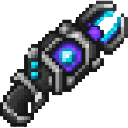
Gravity Flipper

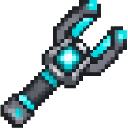
The Core has two uses, including activations that miss. Save it for crafting the Gravity Flipper if you want the reusable main tool.
Abilities And Mechanics
The Flipper affects the first entity in your aim within 24 blocks. An entity that is already being lifted is toggled back to normal when hit again. Invalid entities stop receiving the effect.
Progression And Strategy
Try lifting a target in an open area first, then toggle it off before it reaches a hazard or a high ceiling. Aim carefully when using the Core, since even a missed activation uses up one of its two uses.
How to install
Download the mod and follow the step-by-step installation guide.
This mod is licensed under the CreativeMode Mods License.