CreativeMode

Creative
Mode

ExploreModJamsCreateJoin our community
Sign in
Craft first mod
CreativeMode

Creative
Mode

Sign in
Create
Account
Community
Resources

Create without limits.

Privacy PolicyTerms of Use

© 2026 CreativeMode. Not an official Minecraft product. Not approved by or associated with Mojang or Microsoft.

CREATIVEMODE

    Create
    Account
    Community
    Resources

    Create without limits.

    Privacy PolicyTerms of Use

    © 2026 CreativeMode. Not an official Minecraft product. Not approved by or associated with Mojang or Microsoft.

    CREATIVEMODE

    v1
    MC Bedrock

    Extra large Chest

    by
    nobackingdown
    nobackingdown

    1 download

    v1
    MC Bedrock

    Extra large Chest

    by
    nobackingdown
    nobackingdown

    1 download

    Description:

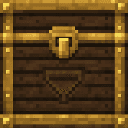
    Extra Large Chest is a craftable, placeable single-block chest that rotates on placement and features custom face textures; it provides 108 persistent item slots while placed and will drop its contents and the chest item when broken normally. Use (right-click/tap) to open a full UI with numbered slot buttons and a Drop All button (you can withdraw filled slots from the UI); sneak (crouch) + use or sneak + hit will quick-deposit the held stack, and sneaking while attempting to break the chest cancels the break and deposits the held stack instead. Hoppers placed above or beside and pointing into the chest insert items at a vanilla-like interval, while a hopper directly beneath will pull whole stored stacks each tick, merging into matching hopper stacks or filling empty hopper slots and leaving any remainder in the chest.

    Mod Wiki

    Grand Hopper Chest

    Quickstart

    1. Gather hoppers, chests, and an ender chest, then craft the Extra Large Chest at a crafting table:
    minecraft:hopper
    minecraft:chest
    minecraft:hopper
    minecraft:chest
    minecraft:ender_chest
    minecraft:chest
    minecraft:hopper
    minecraft:chest
    minecraft:hopper
    Arrow
    com_grand_hopper_chest_hgasyfr7:extra_large_chest
    1. Place it anywhere — it rotates to face you automatically.
    2. Right-click / Tap the chest to open its UI and start storing items.
    3. To quickly deposit whatever you're holding, Sneak + Right-click / Sneak + Tap the chest face.

    Overview

    The Extra Large Chest is a single-block storage block that holds 108 item slots — nearly double a double chest. It has custom textures on every face and its front always faces the player who placed it. Items stored inside persist until you remove them or break the block.


    What It Adds

    Item / BlockDescription
    Extra Large ChestA single placeable block with 108 persistent storage slots and full hopper compatibility.

    How To Use

    Opening the UI

    Right-click or tap the chest while standing normally. A menu appears showing:

    • Numbered slot buttons — one button per occupied or empty slot (108 total).
    • Drop All button — ejects every stored item into the world at the chest's location.

    Tap a filled slot button to withdraw that slot's contents directly into your inventory (or drop it at your feet if your inventory is full).

    Quick-Depositing

    Hold any item stack in your active hotbar slot, then Sneak + Use (crouch and right-click/tap) the chest. The entire held stack is deposited instantly. The action bar confirms how many items were moved. If the chest is full you'll see a message instead.

    Breaking the Chest

    Mine the chest normally (axes are fastest) and it drops both the Extra Large Chest item and all stored items on the ground. If you accidentally start breaking it while sneaking, the break is cancelled and your held stack is deposited instead — a useful safeguard against accidental mining.


    Crafting And Obtaining

    The recipe requires four Hoppers, four Chests, and one Ender Chest arranged in the pattern above, all at a crafting table. The recipe unlocks automatically once you have a hopper and a chest in your inventory.


    Abilities And Mechanics

    Hopper Integration

    The Extra Large Chest works with vanilla hoppers:

    Hopper PositionBehaviour
    Above or beside the chest (pointing in)Inserts items at a normal hopper rate.
    Directly below the chestPulls entire stored stacks every tick, merging with matching stacks in the hopper or filling empty hopper slots. Any amount that doesn't fit stays in the chest.

    Storage Persistence

    The chest's 108 slots are saved independently of the block entity system. Contents survive chunk reloads and are only removed when you withdraw items, use Drop All, or break the chest.


    Progression And Strategy

    • Early consolidation: Replace a wall of double chests with a single Extra Large Chest to free up space in tight storage rooms.
    • Bulk sorting: Place a hopper underneath to rapidly drain the chest into a sorting system — the tick-by-tick bulk pull is significantly faster than a standard hopper pulling from a regular chest.
    • Quick intake: Use Sneak + Use to throw large item hauls into the chest straight from your hotbar without opening the UI.
    • Safety habit: Because sneaking cancels accidental breaks and deposits instead, always approach the chest normally when you intend to mine it.

    How to install

    Download the mod and follow the step-by-step installation guide.

    This mod is licensed under the CreativeMode Mods License.

    CreativeMode

    Creative
    Mode

    ExploreModJams
    Create
    Items or Blocks icon

    Items or Blocks

    Join our community
    Craft first mod
    CreativeMode

    Creative
    Mode

    Craft first mod