


Description
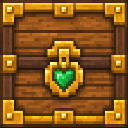
Placeable treasure-chest block with a 10-slot inventory. Right-click to open; when a survival-mode player approaches, the chest automatically transfers all stored items into the nearest player's inventory.
Mod Wiki
Generous Treasure Chest
Quickstart
- Craft a Generous Treasure Chest at a crafting table using the recipe below — it requires a regular Chest surrounded by Gold Ingots.
- Place the block anywhere in the world.
- Right-click (interact) the block to open its 10-slot inventory and store items inside.
- Walk within ~4 blocks of the chest in Survival mode — the chest will automatically push all stored items directly into your inventory.
Overview
The Generous Treasure Chest is a placeable block for Minecraft Bedrock Edition (1.21.93). It looks like a treasure chest and holds up to 10 item slots. Its defining feature is generosity: whenever a Survival-mode player steps close enough, the chest automatically empties itself into that player's inventory — no button press needed.
What It Adds
| Thing | Details |
|---|---|
| Block | com_generous_treasure_chest_l33gj3i6:my_block — Generous Treasure Chest |
| Inventory size | 10 slots |
| Appears in | Items creative menu tab |
How To Use
Storing Items
Right-click the placed chest to open its inventory. Add any items you want it to hold across up to 10 slots.
Automatic Transfer
The chest checks for nearby Survival-mode players roughly once per second. When it detects one within 4 blocks, it immediately transfers every item it holds into the closest player's inventory. If the player's inventory is full, any items that don't fit are left in the chest until space becomes available.
Note: Only players in Survival mode trigger the automatic transfer. Creative-mode players are ignored.
Breaking the Chest
When you break a Generous Treasure Chest, any items still stored inside are dropped on the ground at the block's location. The chest block itself also drops and can be picked up and re-placed.
Crafting And Obtaining
Craft the Generous Treasure Chest at a crafting table by surrounding a regular Chest with Gold Ingots on all sides.
Abilities And Mechanics
- 10-slot inventory accessible by right-clicking the block.
- Proximity auto-transfer: every ~1 second, if any Survival player is within 4 blocks, all stored items are moved to the nearest such player's inventory.
- Transfer cooldown: after a successful transfer, the chest waits at least 2 seconds before transferring again, preventing instant repeat pushes.
- Break-safe: items stored inside are never lost when the block is mined — they drop as item entities on the ground.
- Resistant but breakable: takes about 2.5 seconds to mine by hand and has moderate explosion resistance.
- Non-flammable: the chest cannot be destroyed by fire.
Progression And Strategy
- Loot distribution: load a Generous Treasure Chest with rewards and place it at a finish line or checkpoint — Survival players who reach it automatically collect their prize.
- Auto-resupply station: keep a stocked chest at your base entrance; you'll be restocked with tools, food, or materials every time you return home.
- Player inventory is full? Items that don't fit stay in the chest and will be pushed to you on the next check once you have room, so nothing is lost.
- The chest works in the Overworld, Nether, and The End.
How to install
Download the mod and follow the step-by-step installation guide.
This mod is licensed under the CreativeMode Mods License.