

Description
A rift-filled loaf that shatters any block, fells foes, and blinks you to safety.
Mod Wiki
Fourth Dimension Loaf
Quickstart
Find the Collision Rift Keep in the Overworld near X 128, Z 128. Search its fractured castle and village for a chest containing a Fourth Dimension Loaf. You can also craft one:


Hold the loaf and try these interactions:
- Left-click a block to break it immediately. Right-click a block to do the same.
- Attack a foe with the loaf to deliver a lethal strike.
- Hold Shift and right-click, aiming in the direction you want to go, to try a safe rift blink. This works whether you’re aiming at a block or into the air.
The loaf isn’t consumed by these actions. If the blink can’t find a safe landing spot, you’ll see a message saying so.
Overview
Fourth Dimension Loaf is a tool and weapon disguised as bread. It can break blocks, strike down foes, and move you forward to a nearby safe spot. The mod also includes bedrock armor, a bedrock pickaxe, and a laser cannon.
What It Adds
| Item | What it does |
|---|---|
| Fourth Dimension Loaf | Breaks blocks, deals lethal strikes, and can blink you forward. |
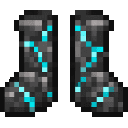
| Bedrock Helmet, Chestplate, Leggings, and Boots | A set of craftable armor. |
| Bedrock Pickaxe | A craftable pickaxe. |
| Laser Cannon | Fires a focused beam at distant foes. |
How To Use
Fourth Dimension Loaf
The loaf breaks a targeted block outright and gives you that block’s item form if it has one. If your inventory is full, the item drops nearby. Blocks without an item form won’t provide a pickup.
For the rift blink, hold Shift and right-click. The loaf searches ahead of your facing direction for a spot with solid ground and enough room for you to stand. It checks locations roughly 6–24 blocks away, so obstacles or unsafe terrain may prevent a blink.
Bedrock Armor and Pickaxe
Equip each armor piece in its matching armor slot. The full set provides 4 armor points for the helmet, 10 for the chestplate, 8 for the leggings, and 4 for the boots. The bedrock pickaxe is held like a regular pickaxe.
Laser Cannon
Hold the cannon and right-click to fire. Aim at a foe within 48 blocks; the beam deals 18 damage and won’t pass through blocks. It has a 1.5-second cooldown and doesn’t need ammunition.
Crafting And Obtaining
The loaf recipe is available after joining a world. The keep is another way to find one.
Having bedrock unlocks the armor recipes. The pickaxe also requires sticks; the cannon requires four Nether Stars, two bedrock, and a Netherite Ingot.
| Item | Recipe |
|---|---|
| Bedrock Helmet | |
| Bedrock Chestplate | |
| Bedrock Leggings | |
| Bedrock Boots | |
| Bedrock Pickaxe | |
| Laser Cannon |
Progression And Strategy
Start by finding the keep or crafting a loaf, then use it to gather blocks and dispatch threats. Shift-right-click is useful for crossing gaps or getting out of a tight spot, but it needs a clear, safe landing area ahead. Craft the bedrock armor for defense, and use the laser cannon when you want to attack from a distance.
How to install
This Java mod can be used on Windows and Mac PCs with the CreativeMode Launcher or any Minecraft launcher of your choice.

1. Download and install the new CreativeMode Launcher
2. Click to play on the top of the screen.
3. That's it — launches instantly. No complicated setup required.
Want to use on a different launcher? Download mod and manually install.
This mod is licensed under the CreativeMode Mods License.