

Description
it cant die even /kill blow cant kill u
Mod Wiki
Eternal Aegis
Quickstart
Craft all four pieces using the recipes below, then equip the helmet, chestplate, leggings, and boots in their matching armor slots. The set’s special protection works only while all four Eternal Aegis pieces are equipped together. Try it against incoming damage to see the effect.
Overview
Eternal Aegis is a four-piece armor set. Each piece provides armor and armor toughness; wearing the complete set also protects you from damage and prevents kill attempts.
What It Adds
| Piece | Armor | Armor toughness |
|---|---|---|
| Eternal Aegis Helmet | 4 | 4 |
| Eternal Aegis Chestplate | 8 | 4 |
| Eternal Aegis Leggings | 6 | 4 |
| Eternal Aegis Boots | 4 | 4 |
| Full set total | 22 | 16 |
How To Use
Equip each piece in its matching armor slot. The special protection activates only when you wear the exact Eternal Aegis helmet, chestplate, leggings, and boots together. Replacing or removing any piece ends the full-set protection.
Crafting And Obtaining
Craft each piece at a crafting table:
Eternal Aegis Helmet
Requires a diamond helmet, netherite ingots, a nether star, and totems of undying.



Eternal Aegis Chestplate
Requires obsidian, diamond blocks, a nether star, and a totem of undying.



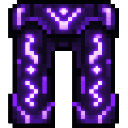
Eternal Aegis Leggings
Requires netherite ingots, a nether star, and totems of undying.
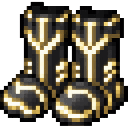
Eternal Aegis Boots
Requires netherite ingots, diamonds, a nether star, and totems of undying.

Abilities And Mechanics
With the full set equipped, incoming damage is blocked, and attempts to kill the wearer are prevented. The protection depends on having all four matching pieces on at once; individual pieces provide their listed armor and toughness but do not activate the set’s special protection.
Progression And Strategy
Gather the rare ingredients for all four recipes before relying on the set’s special protection. Check that every armor slot contains the matching Eternal Aegis piece whenever you want the full-set effect.
How to install
This Java mod can be used on Windows and Mac PCs with the CreativeMode Launcher or any Minecraft launcher of your choice.

1. Download and install the new CreativeMode Launcher

2. Click to play on the top of the screen.
3. That's it — launches instantly. No complicated setup required.
Want to use on a different launcher? Download mod and manually install.
This mod is licensed under the CreativeMode Mods License.