

Description
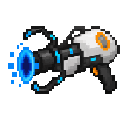
Mark two spots with the Endless Portal Sight, then jump between them instantly.
Mod Wiki
Endless Portal Sight
Quickstart
- Craft an Endless Portal Sight using the recipe below, or take one from the Creative inventory’s Tools & Utilities tab.
- Hold the sight and use it while aiming at a block within 96 blocks to set your first anchor.
- Aim at a second block and use the sight again to link the anchors.
- Use the sight once more to teleport between them. Crouch-use while aiming at a block to start a new pair.
Overview
The Endless Portal Sight lets you set two personal destinations and teleport between them. The anchors can be in different dimensions. You do not need to build a portal frame.
What It Adds
- Endless Portal Sight: A single-stack item for placing anchors and travelling between them.
How To Use
- Aim at a block and use the sight to place each anchor. You must be able to target the block within 96 blocks.
- After the second anchor is set, use the sight to travel to the paired location. You do not need to aim at either anchor to travel.
- To replace your pair, crouch-use the sight while aiming at a block; that block becomes the first anchor of a new pair. Aim at another block and use it again to link the new pair.
- Each player has their own anchor pair.
Crafting And Obtaining
Craft one Endless Portal Sight:


Abilities And Mechanics
When both anchors are in the same dimension, the sight sends you to the opposite anchor from the one nearer to you. Anchors can also be placed in different dimensions and used for cross-dimensional travel.
How to install
This Java mod can be used on Windows and Mac PCs with the CreativeMode Launcher or any Minecraft launcher of your choice.

1. Download and install the new CreativeMode Launcher

2. Click to play on the top of the screen.
3. That's it — launches instantly. No complicated setup required.
Want to use on a different launcher? Download mod and manually install.
This mod is licensed under the CreativeMode Mods License.